
Writing lyrics: on your own, with AI or from a file
Give your story a structure that's easy to sing, and check it before you create.
Choose where to start
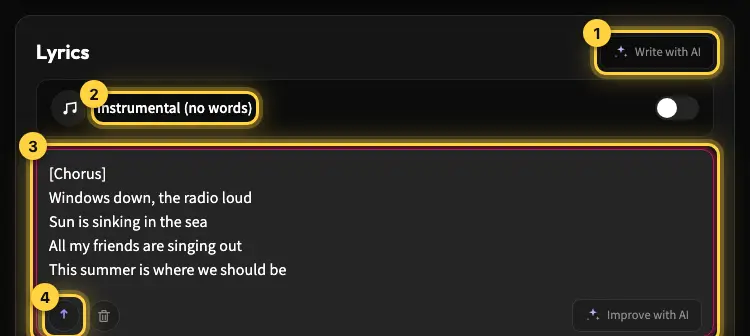
In the Lyrics box you can type or paste text. You can also upload a txt, lrc or md file. Write with AI creates a draft from your topic and style, and Improve with AI helps polish existing text. Whichever you choose, read the result again: an AI suggestion can change the wording or a personal detail.
Build a clear verse and chorus
Start with a verse that sets up the story and a chorus with the main message. For example, the verse could describe a family trip and the chorus could say thank you to Dad. Use short lines and natural language. Not every line has to rhyme; a sentence that's easy to understand and sing beats forced wording.
What not to paste into the box
Keep only the text that's meant to be sung. Notes to yourself, long explanations and instructions that belong in the style can end up in the result. Set instruments, mood and voice in the Style field. Check names, and make sure the wording fits whoever is singing.
How lyrics affect length
There's no separate length setting. The number of words affects how long the song runs, but it's not an exact clock. Without a Premium subscription (even after buying a credit pack), a song with lyrics can run up to about 2:30, which is roughly 230 words. If you're asked to shorten your lyrics, follow the message. Very few words (under about 80) make a song shorter than a minute, and you'll see a warning about it.
One last check before you create
Read the verse and chorus out loud. Fix clumsy lines, check the lyrics language and the names, and only then start creating. Changing the lyrics after production with a remix creates a new take and doesn't promise to keep the previous melody.
Still need help?
Message us on Telegram and we'll be glad to help.