
Your first song, step by step
From a short idea to two musical versions you can listen to and share.
Before you start
You don't need any musical experience. To create on your own, sign up for an account and pick an idea: who the song is for, what the story is, and how it should feel. A new account gets 10 credits, once. Each creation costs 5 credits and includes two musical versions, so the sign-up bonus covers two creations.
1. Write an idea with a story in it
Open the create page and choose Simple mode. In the "Describe your song" box, write a sentence or two. For example: "A birthday song for my dad Joe, who loves hiking and black coffee. Mention our family trip to the lake. Upbeat acoustic pop with male vocals." The personal details steer the story; the style description steers the sound.
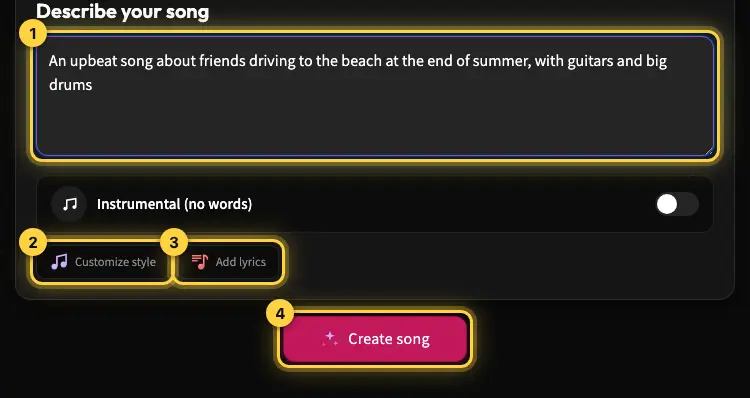
2. Choose how much control you want
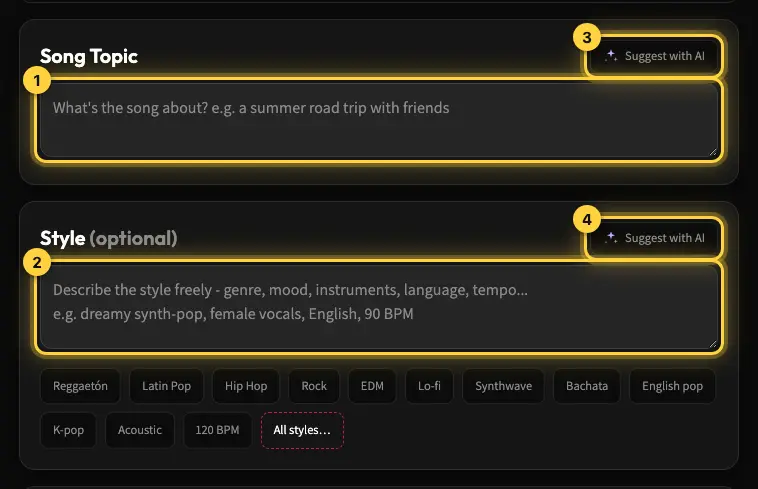
You can let Kleep write the lyrics from your description. If you've already written lyrics, click Add lyrics: the page switches to Advanced mode and your description comes with you. In Advanced mode, the topic, style and lyrics sit in separate fields, so you can read and edit each one on its own. Before you create, check names, pronouns and any details that need to be in the song.
3. Create and listen to both versions
Check the cost shown and start creating. The song is produced in the background, so you can keep browsing. When it's ready, it appears in your library, and the second version has "(Version 2)" after its name. Listen to both before you choose: the performance, voice and mood can differ even from the same starting point.
What to do after listening
You can share your favorite version with a link, add it to a playlist, or create a remix for additional credits. New songs are private by default, but anyone who has the link can listen. Downloading a file depends on your download eligibility. If you wanted a finished gift without an account, read about the gift song option, which is a separate path.
Still need help?
Message us on WhatsApp and we'll be glad to help. What to include in your message