
AI Song Lyrics: How to Write Words That Sound Great in Any Musical Style
The hardest part of making a song with AI is not the melody or the mix - it is the blank page. Most people who open a music generator freeze on the same question: what words do I even type? The good news is that great lyrics are less about talent and more about a handful of repeatable habits. This guide walks you through structure, rhythm, and syllables, adds tips for writing in Hebrew, and shows how to move from a rough idea to a finished track.
Start with structure, not with a masterpiece
A song is not a paragraph. It is a set of labeled sections that repeat, and those labels are the single most useful thing you can give an AI music tool. When you tag your text with [Verse], [Chorus], and [Bridge], you are telling the model where the energy should rise, where the hook lives, and where to breathe.
The classic pop skeleton is simple and it works for almost any genre:
- Verse 1 - sets the scene and introduces the story or feeling.
- Chorus - the emotional peak and the line people will remember. Keep it short and repeatable.
- Verse 2 - moves the story forward, ideally with a small change or twist.
- Chorus - repeat it, almost word for word, so it lands harder.
- Bridge - a contrast section: new melody, new angle, often the turning point.
- Final chorus - the payoff, sometimes with an added line for lift.
You do not need every section every time. A two-verse-and-a-chorus song is completely legitimate. But labeling what you have removes the guesswork for the model and for yourself. For more layouts and when to use each one, see our song structure guide.
The chorus is a promise you repeat
If you only polish one part, make it the chorus. It is the part that repeats, so a weak chorus is a weakness the listener hears three or four times. A strong chorus usually does three things: it names the core feeling, it uses plain words, and it stays under about eight words per line so it can breathe over a melody.
[Chorus] Hold the light, don't let it go Even when the night is slow We are still here, we are still gold Hold the light, don't let it go
Notice how the first and last lines are identical. That repetition is not lazy - it is how hooks get stuck in your head. Save your clever, specific, image-heavy writing for the verses, and keep the chorus clean.
Rhythm and syllables: writing for a melody, not a page
Lyrics that read well on paper can be impossible to sing. The reason is almost always syllable count. A melody has a fixed number of beats, and if your lines have wildly different lengths, the singer has to cram or stretch words unnaturally.
A reliable trick: keep matching lines close in syllable count. Count them out loud on your fingers.
- Aim for consistency between paired lines - if line one has eight syllables, line two should be seven to nine, not fourteen.
- Put the most important word on a strong beat, usually the start or end of a line.
- Favor short, common words in fast sections and save longer words for slow, spacious moments.
- Read every line aloud. If you stumble, the singer - human or AI - will too.
Rhyme helps, but do not force it. A near rhyme (light / night / time) often sounds more natural than a perfect rhyme that bends your meaning. Meaning first, sound second.
Writing lyrics in Hebrew
Hebrew brings its own rhythm and its own opportunities. Because roots carry meaning and words are often compact, you can say a lot in few syllables - but that same density can make lines feel crowded if you are not careful.
- Watch your syllable count carefully - Hebrew words with prefixes and suffixes (ה, ו, ש, כש) add beats that are easy to miss.
- Mind the stress. Many Hebrew words stress the final syllable, so end your lines on words whose natural stress matches the beat.
- Lean into rich, simple rhymes that Hebrew offers naturally, but avoid overly biblical or archaic phrasing unless the style calls for it.
- Read for the singer, not the eye - a line that scans on screen may feel rushed when sung.
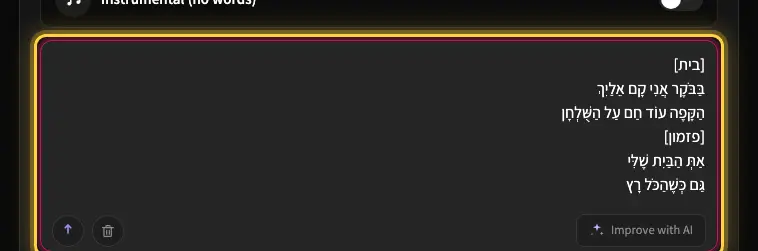
[פזמון] תחזיק את האור, אל תיתן לו לכבות גם כשהלילה איטי ורחוק אנחנו עוד כאן, אנחנו זהב תחזיק את האור, אל תיתן לו לכבות
In Kleep you can write your lyrics in Hebrew and keep the vocal in Hebrew, and the tool respects that choice through the whole pipeline. You can type plain Hebrew: Kleep adds nikud automatically before the vocal is generated, so manual nikud is only needed to force a rare name or word (more in the Hebrew pronunciation help article). Short, clear Hebrew lines almost always sing better than long literary ones.
One idea, many styles
The same set of words can become a ballad, a rap, or an upbeat pop anthem - the trick is that different styles want different densities. A ballad breathes and wants fewer syllables per line; a rap packs many syllables into every beat; folk sits somewhere in the middle.
So when you pick a style, glance back at your lines and adjust. If you chose something fast and driving, tighten your phrasing. If you chose something slow and open, give each line room. Then let the tool handle melody, arrangement, and mix.
A good lyric is not the one that reads best. It is the one that a voice can actually carry - with room to breathe and a hook worth repeating.
From words to a finished song
Once you have labeled sections, a tight chorus, and lines that scan, you are ready. Head to Create, switch to Advanced mode, paste your lyrics, choose a style, and generate. On free credits, songs with lyrics run up to about 2:30, roughly 230 sung words; use Premium for longer songs. The lyrics help article explains the editor, Write with AI and Improve with AI. If you get stuck, browse Explore to hear how other creators structured their tracks, and reverse-engineer what works.
You do not have to get it perfect on the first try. Each creation gives you two versions; listen, tweak a line or two, and generate again. That short loop - write, hear, adjust - is where real songs come from. For more practical walkthroughs, keep an eye on the blog.
Frequently asked questions
How do I format lyrics so an AI music generator sings them correctly?
Label every section with tags such as [Verse], [Chorus], and [Bridge]. The tags tell the model where the energy rises, where the hook lives, and where to breathe, and they remove guesswork for you too. A classic skeleton is verse, chorus, verse, chorus, bridge, final chorus, but two verses and a chorus is completely legitimate. Keep chorus lines short, under about eight words, so they can breathe over a melody.
How many syllables should each line of a song have?
There is no fixed number, but paired lines should be close: if line one has eight syllables, line two should have seven to nine, not fourteen. A melody has a fixed number of beats, and uneven lines force the singer to cram or stretch words unnaturally. Count out loud on your fingers, put the most important word on a strong beat at the start or end of the line, and read every line aloud.
Do song lyrics have to rhyme?
No. Rhyme helps a hook stick, but a forced rhyme that bends your meaning sounds worse than no rhyme at all. Near rhymes such as light, night, and time often feel more natural than perfect ones. Put meaning first and sound second, use plain words in the chorus, and save clever, image-heavy writing for the verses where you have more room.
What makes a good chorus in an AI-generated song?
A strong chorus names the core feeling, uses plain words, and keeps each line short enough to breathe over the melody. It repeats, so a weak chorus is heard three or four times; polish it before anything else. Repeating the first line as the last line is a classic trick that helps the hook stick. Write it as a promise you keep returning to, not as a paragraph.
How do I write Hebrew lyrics that sound natural when sung by AI?
Watch syllable count closely, because Hebrew prefixes and suffixes such as ה, ו, ש, and כש add beats that are easy to miss. Mind stress: many Hebrew words stress the last syllable, so end lines on words whose natural stress lands on the beat. Use the rich, simple rhymes Hebrew offers, avoid biblical or archaic phrasing unless the style calls for it, and keep lines short and clear. In Kleep you can write in Hebrew and keep the vocal in Hebrew.
Do I need to change my lyrics when I switch from a ballad to rap or pop?
Usually yes, because styles want different densities. A ballad breathes and wants fewer syllables per line, rap packs many syllables into every beat, and folk sits in between. After picking a style, glance back at your lines: tighten the phrasing for something fast and driving, or give each line room for something slow and open. The words can stay; the spacing changes.
About the author
Kleep Editorial TeamAI music guides and product team
The Kleep editorial team builds and tests Kleep's AI song generator every day and writes practical, hands-on guides to creating songs with AI in English and Hebrew.
Create a song for the occasion
Keep reading
How Kleep Sings Hebrew: Every Layer Between Your Words and the Song
AI music tools were built for English. Every layer Kleep adds for Hebrew: grammar and gender checks, Dicta nikud, phonetic fixes and voice matching.
Creating Religious Music With AI: Niggunim, Piyyutim and Kodesh Songs in Hebrew
Create religious and Jewish music with AI in Hebrew: niggunim, piyyutim, Shabbat and holiday songs, with natural Hebrew pronunciation in minutes.
AI Song Composer: How to Write an Original Melody Without Knowing Any Notes
No need to read music to compose an original song. Use Kleep as your AI composer and turn a mood, theme or a few lines into a full melody in minutes.