
How to Create an AI Song: A Beginner's Guide
Making a song used to mean years of practice, gear, and studio time. Today you can describe a song in one sentence and hear it a couple of minutes later - lyrics, melody, vocals, and arrangement included. But there is a big difference between making a song with AI and making a good one. This guide walks you through the whole process, from the first idea to a finished track, with no musical background required.
What is an AI song?
An AI song is a full piece of music - vocals, lyrics, instruments, and mix - generated by an AI model from a text description. You do not play or record anything. You describe what you want to hear, and the AI composes the melody, arranges the instruments, sings the lyrics, and delivers a track you can listen to and download.
Think of it as a collaboration: you set the idea and the creative direction, and the AI does most of the composing and production work. Every attempt is fast and reversible, so you cannot break anything.
What you need
- A device with a browser - phone, tablet, or laptop.
- An idea - even a very short one.
- A rough musical direction - pop, rock, rap, acoustic, electronic, a ballad.
- Lyrics, if you have them - or a topic the AI can write lyrics from.
- A free Kleep account - sign-up gives you 10 credits once, enough for 2 songs (each creation returns 2 versions). New to it? See free AI music in Hebrew for beginners.
No instruments, no music theory, no microphone, and no production software.
Step by step: your first AI song
Step 1: Start with an idea
You do not need to know exactly how the song should sound. "A happy song about a family beach vacation, upbeat and catchy" is already a solid starting point. You can add details as you go.
Step 2: Decide how it should feel
The same idea can become completely different songs. A family vacation can be a sunny summer pop track, a driving rock song with electric guitars, a quiet acoustic ballad full of nostalgia, or an electronic dance track with a big chorus. Pick the mood before anything else.
Step 3: Choose a genre and style
Genre shapes the result more than almost anything. Go beyond the label and describe the vibe too: "bright, upbeat pop" is very different from "slow, nostalgic pop" or "dramatic pop with a slow build and a huge chorus."
Step 4: Write the lyrics (or let the AI do it)
The easiest route is to give Kleep a topic, like "a father and his 14-year-old son on their first road trip together, talking and laughing on the way." The more specific the story, the better the lyrics. If you already have words - a poem, a story, a chorus - paste them in and turn something personal into a real song.
Step 5: Give it a structure
Label your sections so the AI understands the shape of the song. The verse moves the story forward, the chorus carries the main idea and is the part people remember, and the bridge adds a change before the final chorus. A reliable starting layout: Verse 1, Chorus, Verse 2, Chorus, Bridge, Chorus.
[Verse 1] We left before the city woke Windows down and the radio on [Chorus] There's nowhere we need to be Just one more mile, just you and me
Step 6: Write a clear prompt
A longer prompt is not better; a clearer one is. Cover four things: genre, mood, vocals, and subject. A few prompts you can start from:
- "An upbeat, emotional pop song about a fresh start after a hard year, soft female vocals, piano and guitars, big catchy chorus."
- "A slow, melancholic ballad about letting go of someone you still love, gentle piano, strings, emotional male vocals."
- "A playful kids' song about a cat who wants to be king, bouncy rhythm, energetic vocals, a chorus that is easy to sing along to."
Step 7: Create it in Kleep
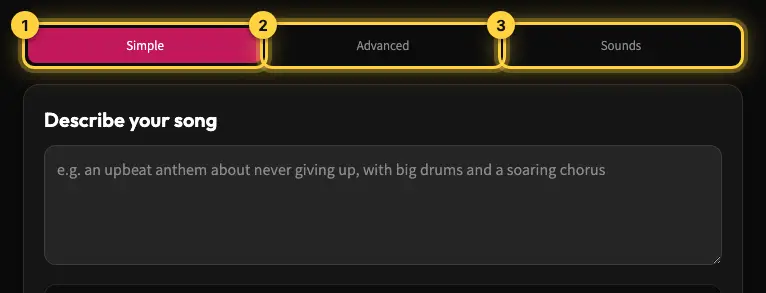
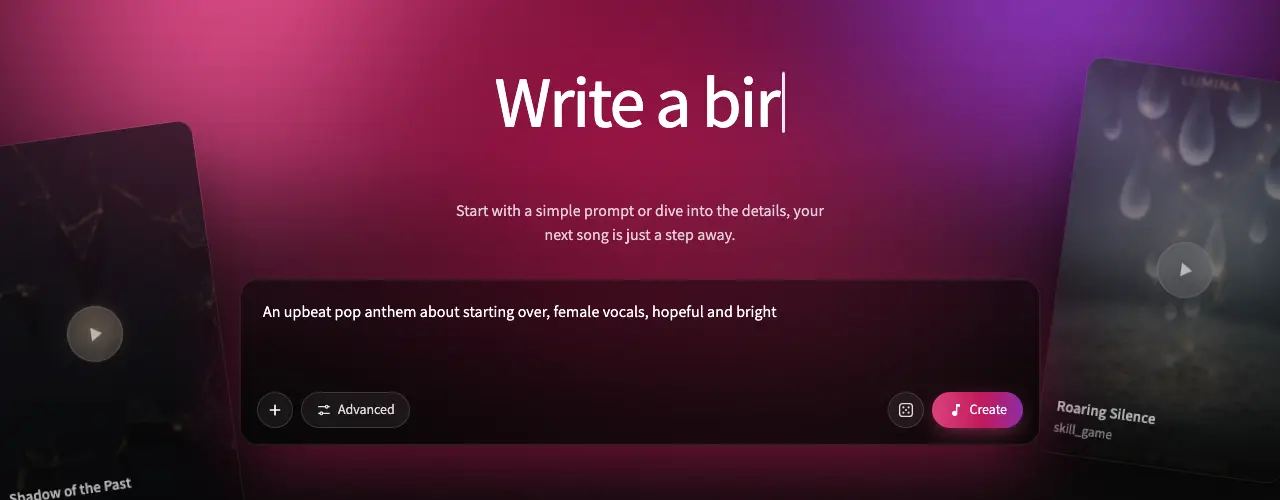
The Create page has three modes: Simple (describe the song and Kleep writes the lyrics and style), Advanced (your own lyrics and Style field) and Sounds (upload or record a clip to steer the song). Prefer a ready-made starting point? Pick one of the templates.
- Open the Create page.
- Describe your song in Simple mode, or switch to Advanced for full control.
- Choose the lyrics language and a style.
- Paste your own lyrics or let Kleep write them.
- Press create - one creation costs 5 credits and usually takes about 1-2 minutes.
- Listen to both versions you get back. Songs are saved to your Library automatically. MP3 download comes with Premium, or for 30 days after buying a credit pack.
When the result isn't what you imagined
Do not expect the first version to be the final one. You might ask for "calm and emotional" and get something far more dramatic, or ask for "upbeat" and get something close to a ballad. That usually means the prompt left too much room for interpretation.
Do not start over. Name exactly what is off - the tempo is too fast, the vocals do not fit, the chorus is not catchy, there are too many instruments, the lyrics feel unnatural - and change only that. If everything works except the tempo, keep the rest of the prompt.
Swap vague words for concrete ones. Instead of "a happy song," try "upbeat, light pop with clear drums, bright guitars, and an energetic chorus." Treat every generation as an experiment: one may give you a better chorus, another a better vocal.
Writing songs in Hebrew
Hebrew differs from English in pronunciation, stress, and rhythm, so lyrics that look great on screen do not always sing naturally. When you create a Hebrew song, listen closely for correct pronunciation and stress, lines that flow when sung, and a chorus that sounds natural. If one word trips the AI up, rephrase that line rather than the whole song. Kleep is built with Hebrew in mind - just choose Hebrew as the lyrics language, and nikud is added automatically. More in the Hebrew pronunciation guide.
Common beginner mistakes
- Being too vague - "make a good song" gives the AI nothing to work with.
- Overloading the prompt - pop, rock, jazz, and metal, sad and happy at once. Pick one clear direction.
- Writing for the eye, not the ear - long, literary lines are hard to sing. Break them into short, rhythmic phrases.
- No clear chorus - without a central hook, the song feels like one long verse.
- Changing everything instead of one thing - identify what is wrong and fix only that.
- Ignoring pronunciation - especially in Hebrew, listen to how every line is sung.
- Not comparing versions - every creation gives you two versions, both saved in your Library. Listen to both before changing the prompt.
Song ideas to get you started
- Personal - your childhood, a best friend, a change you went through.
- Gifts - a birthday, an anniversary, a wedding, a song for mom or dad.
- Content - a podcast intro, a YouTube theme, background music for a video.
- Just for fun - your cat, your boss, your friend group, something funny that happened.
Need more inspiration? Browse the Explore page to hear what others are making.
Frequently asked questions
Do I need to know music to create a song with Kleep?
No. You describe the idea, style, and mood in plain words, and Kleep handles the melody, vocals, and arrangement.
Can Kleep write the lyrics for me?
Yes. Give Kleep a topic or story and it will generate lyrics, or paste your own lyrics and it will build the song around them.
How long does it take to create a song?
A song is usually ready in about 1-2 minutes, and each creation gives you two versions. Getting a version you truly love may take a few attempts. Free songs with lyrics run up to about 2:30; Premium allows longer songs.
Can I create songs in Hebrew?
Yes. Choose Hebrew as the lyrics language. It is worth listening closely to pronunciation and stress and rephrasing any line that does not flow.
Can I use my songs commercially?
Yes. Kleep assigns you any rights it holds in your songs, and commercial use is allowed on every plan, including free credits. Purely AI-generated music may not be protected by copyright, and uniqueness is not guaranteed (terms). The inputs you use, such as your lyrics, must be yours or used with permission.
Can I download my song as a video?
Yes, with Premium. You can make a lyric video of 15 seconds or a custom 5-60 second range from your own song, ready to share on social media.
What should I do if the first result is not good?
Identify exactly what is off, change only that part of the prompt or lyrics, and generate again.
About the author
Kleep Editorial TeamAI music guides and product team
The Kleep editorial team builds and tests Kleep's AI song generator every day and writes practical, hands-on guides to creating songs with AI in English and Hebrew.
Create a song for the occasion
Keep reading
How Kleep Sings Hebrew: Every Layer Between Your Words and the Song
AI music tools were built for English. Every layer Kleep adds for Hebrew: grammar and gender checks, Dicta nikud, phonetic fixes and voice matching.
Creating Religious Music With AI: Niggunim, Piyyutim and Kodesh Songs in Hebrew
Create religious and Jewish music with AI in Hebrew: niggunim, piyyutim, Shabbat and holiday songs, with natural Hebrew pronunciation in minutes.
AI Song Composer: How to Write an Original Melody Without Knowing Any Notes
No need to read music to compose an original song. Use Kleep as your AI composer and turn a mood, theme or a few lines into a full melody in minutes.