
Creating AI Music for Free in Hebrew: The Complete Beginner's Guide
If you have never made music before and you want a song in Hebrew, this is the guide for you. You do not need an instrument, a studio, or any budget to start. With Kleep you can create your first Hebrew song for free, and this walkthrough takes you from a blank screen to a finished track that sounds natural in Hebrew - including a full worked example, the mistakes beginners make most often, and what the free tier actually covers.
What you need before you start
Almost nothing. To create your first song for free you need:
- An idea of what the song is about - a person, an event, a feeling, or a theme.
- A rough sense of the mood - happy, emotional, calm, energetic. You can describe this in everyday words.
- A free account and a few minutes. Creating a song requires signing up (Google, Apple, Facebook, Discord or email). No music knowledge, no equipment, no payment to begin.
What you do not need is just as important: no notation, no DAW, no microphone, no singer. If you have never written a note in your life, the guide on composing an original melody with no musical notation covers why that is no longer a barrier. And if the words are the part that worries you, the AI song lyrics guide shows how to get usable lyrics out of a one-line idea.
Step by step: your first free Hebrew song
1. Open the free generator
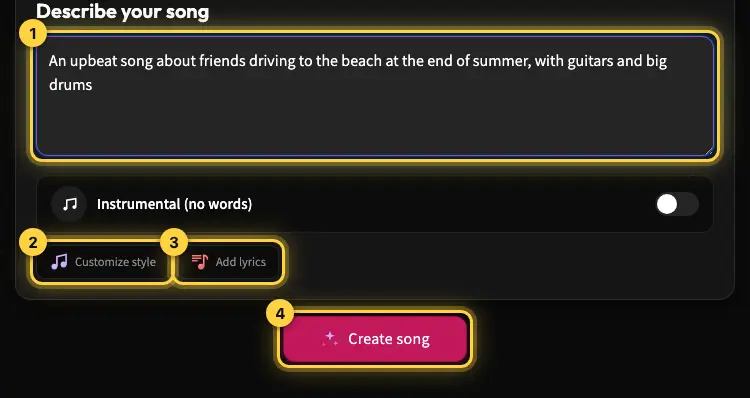
Start at the free AI song generator. A new account gets 10 credits once at sign-up. A song costs 5 credits, so that is 2 songs, and each creation returns 2 versions, so you hear 4 takes before you decide whether to pay for anything. Stay in Simple mode for your first song: one description box, and Kleep writes the lyrics and style for you. For a broader walkthrough of every step, see the beginner's guide to creating an AI song.
2. Write in Hebrew - this is the single most important step
When you type the theme, the lyrics, and any names directly in Hebrew, the whole song stays in Hebrew and the pronunciation comes out far more natural than if you mix languages. Writing the brief in English and expecting Hebrew output is the most common reason a first song sounds wrong.
3. Describe the topic simply and specifically
"A song for my mom's birthday," "a calm song about the sea," "an upbeat song about friendship." Plain and specific beats long and poetic. If you want to go deeper on how wording changes the result, the music prompt writing guide breaks down what each part of a prompt actually controls.
4. Choose a mood and a style
Warm, cheerful, emotional, energetic - describe the feeling in your own words and the tool sets the instruments and the pace. If you are not sure which direction suits your idea, choosing a genre and style walks through the common options and what each one does to a Hebrew vocal.
5. Let the tool write the lyrics, or paste your own
If you already have words, use them - see turning existing lyrics into a song. If not, let Kleep generate Hebrew lyrics that fit the melody, then edit the lines you do not like and regenerate.
6. Generate, listen, and change one thing at a time
Your first song is ready in a couple of minutes, in two versions. Play both end to end. If something is off, change a single variable - the mood, or the style, or one lyric line - and generate again. Changing three things at once tells you nothing about which one mattered.
7. Save and share
Every song is saved in your library automatically, and you can send a share link to whoever it is for. MP3 download comes with Premium, or for 30 days after buying a credit pack.
A full worked example
Here is a real brief and what each part of it does. Say you want a song for a grandmother's eightieth birthday.
שיר ליום ההולדת ה-80 של סבתא רבקה. חם, שמח ומרגש, קצב בינוני, גיטרה אקוסטית ופסנתר. הפזמון חוזר על השם רִבְקָה.
Four things are doing work in that single sentence:
- The occasion and the name - "יום ההולדת ה-80 של סבתא רבקה" gives the lyrics a subject and a real name to sing, which is what makes a personal song land.
- The mood - "חם, שמח ומרגש" sets the emotional register without naming a genre.
- The arrangement - "קצב בינוני, גיטרה אקוסטית ופסנתר" tells the model what to play. Two named instruments is usually enough; a list of eight is not better.
- The name, spelled clearly - Kleep adds nikud automatically, so a common name like רבקה is sung correctly as typed. Writing the nikud yourself (רִבְקָה) is only needed to force a rare name or an unusual reading.
Generate that, listen, and if the chorus feels flat, change only the mood word and try again. For a full occasion-specific walkthrough, see creating a Hebrew birthday song.
Getting Hebrew to sound natural
Hebrew has sounds and stress patterns that can trip up a generic AI voice, so a few small habits make a big difference:
Write the way people actually speak
Natural spoken Hebrew sings far better than lyrics translated word-for-word from another language. Literary word order that reads fine on a page often scans badly when sung, because Modern Hebrew stress usually falls on the final syllable and a melody has to accommodate that.
Let Kleep add the nikud
Hebrew is normally written without vowels, so a word that can be read more than one way is ambiguous to a model. Kleep adds nikud automatically and spells the lyrics phonetically for the singer, so you do not need to vocalize your lyrics. Add nikud by hand only to force a rare name or a word that still comes out wrong. The Hebrew pronunciation help article explains how it works.
Choose a Hebrew-appropriate voice
A vocal style matched to the language keeps the rhythm and phrasing aligned with real Hebrew pronunciation. Kleep has no separate voice picker, so describe the vocal in the style prompt (for example "warm female vocal"); otherwise the singer's gender is matched to the lyrics.
For the deep version of this topic, read improving Hebrew pronunciation quality - but for your first song, writing directly in Hebrew is 90% of the battle.
Five mistakes beginners make
- Writing the brief in English. The output drifts toward English phrasing and an accented vocal. Write in Hebrew from the first word.
- Cramming everything into one prompt - or naming artists. A brief that names a mood, six instruments and a decade gives the model contradictory instructions, and naming a real artist in Style blocks the generation altogether. Describe the sound instead. Two or three clear signals beat ten vague ones.
- Not checking the name. Personal songs live or die on the name being sung correctly. Nikud is automatic, but listen for the name first, and add nikud by hand only if a rare name still comes out wrong.
- Changing five things between attempts. You lose the ability to tell what helped. Change one variable per generation.
- Ignoring song structure. A song with no chorus feels like it never arrives. The song structure guide covers the standard shapes and when to use each.
What the free tier covers
Kleep runs on credits. A new account gets 10 credits once at sign-up (there is no daily or monthly free allowance). Each song costs 5 credits, so that is 2 songs, and each creation returns 2 versions. Free songs with lyrics run up to about 2:30 (about 230 sung words). If a generation fails, the credits go back to your balance, so you only pay for results.
That is enough to write a real song, listen to it, adjust it and share a link. Free credits do not include downloads: MP3 download comes with Premium, or for 30 days after buying a credit pack. Premium also adds cover art, lyric videos and songs longer than 2:30, and refills your balance to 150 credits each month. See pricing for the current numbers and the credits and Premium help article for how credits work.
What you can make for free
- A birthday song for someone you love, with their real name.
- A personal song about a memory, a place, or a feeling.
- A fun song for a family event, a group chat, or just to try it out.
- A first experiment to learn how prompts shape the result before you do anything bigger.
Once you have made a few, the Hebrew song generator checklist is a quick pass to run over each one before you share it, and 10 ways to improve AI song quality covers what to fix when a song is close but not quite there.
Start now
Creating music in Hebrew no longer needs a studio or a budget. Open the free AI song generator, write your idea in Hebrew, and have a finished song in a few minutes. When you want the full toolset, the complete create experience is one click away.
Frequently asked questions
Do I need to know music to create a Hebrew song for free?
No. You describe the song in ordinary words: the subject, the feeling, and roughly how fast it should be. The tool handles key, chords, arrangement and mixing, and writes the Hebrew lyrics if you do not have any. There is no notation, no recording software, no microphone and no singer to find. The only skills that matter are choosing a specific idea and writing the brief in Hebrew rather than in English.
How long does one free Hebrew song take to generate?
A couple of minutes from pressing generate to listening to a finished track, and each creation gives you two versions. Most of the time you spend is on writing the brief and deciding what to change on the next pass. Budget a few extra minutes for one or two more generations, changing a single variable each time, such as the mood word or one lyric line, so you can tell exactly what improved the result.
Can I paste my own Hebrew lyrics instead of letting the AI write them?
Yes. Paste your lyrics in instead of letting the tool write them, and the melody is built around your words. Keep the lines the way people actually speak, because literary word order that reads well on a page often scans badly when sung. Nikud is added automatically; add it by hand only to force a rare name. You can also let the tool draft the lyrics, then edit the lines you dislike and regenerate.
Why does my Hebrew AI song sound like it has an accent?
Almost always because part of the input was not in Hebrew. Writing the brief in English and expecting Hebrew output pulls the phrasing and the vocal toward English. Fix that first: type the theme, names and lyrics directly in Hebrew. Kleep adds nikud automatically, so vocalize by hand only a rare name that still comes out wrong. Then describe the vocal you want in the style prompt. Only after that should you change the mood or the genre.
What should my first Hebrew song prompt look like?
One plain sentence in Hebrew that names the occasion or subject, a real name if the song is personal, two or three mood words, a tempo, and at most two instruments. For example: a song for grandma Rivka's 80th birthday, warm, happy and moving, medium tempo, acoustic guitar and piano, chorus repeats her name. Two or three clear signals beat a list of six instruments and a decade, and never name a real artist, since that blocks the generation.
What does the free tier include, and do I lose credits if a generation fails?
A new account gets 10 credits once at sign-up, which is 2 songs at 5 credits each, and every creation returns 2 versions. Free songs with lyrics run up to about 2:30. If a generation fails, the credits return to your balance, so you only pay for results. Free credits do not include downloads: MP3 download comes with Premium, or for 30 days after buying a credit pack. Premium also adds cover art, lyric videos and longer songs. Current numbers are on the plans page.
About the author
Kleep Editorial TeamAI music guides and product team
The Kleep editorial team builds and tests Kleep's AI song generator every day and writes practical, hands-on guides to creating songs with AI in English and Hebrew.
Keep reading
How Kleep Sings Hebrew: Every Layer Between Your Words and the Song
AI music tools were built for English. Every layer Kleep adds for Hebrew: grammar and gender checks, Dicta nikud, phonetic fixes and voice matching.
Creating Religious Music With AI: Niggunim, Piyyutim and Kodesh Songs in Hebrew
Create religious and Jewish music with AI in Hebrew: niggunim, piyyutim, Shabbat and holiday songs, with natural Hebrew pronunciation in minutes.
AI Song Composer: How to Write an Original Melody Without Knowing Any Notes
No need to read music to compose an original song. Use Kleep as your AI composer and turn a mood, theme or a few lines into a full melody in minutes.