
Does AI Actually Sing Hebrew Well? Getting Natural Hebrew Pronunciation
Hebrew is a harder language for singing AI to get right than English. It has consonants that do not exist in most training data, vowel patterns that shift meaning entirely, and a writing system that often omits the very vowel marks a model needs to pronounce a word correctly. The good news is that with a few deliberate choices, the results can sound genuinely natural - not just "understandable," but pleasant to listen to. Here is what actually matters.
Why Hebrew is harder than English for AI singing
Standard written Hebrew drops nikud (the vowel points) almost everywhere outside of children's books and prayer texts. That means a word like שלום is unambiguous, but a name like דנה could theoretically be read more than one way without extra context. A singing model has to guess the vowels from context the same way a human reader does - and it does not always guess right.
On top of that, Hebrew has consonants with no real English equivalent, most notably the guttural sounds at the back of the throat: ע (ayin) and ח (het). These are exactly the sounds that get flattened or mispronounced most often, especially at the end of a word, where a singing voice tends to round off the ending instead of holding the guttural shape.
The final-guttural problem, explained simply
Listen closely to Hebrew AI vocals and the most common giveaway is at the very end of words that finish in ע or ח - a word like רגע (moment) or נוגע (touching). A model trained mostly on other languages tends to soften that final sound into something closer to a plain "ah" or "eh," instead of the sharper, more constricted furtive-patach sound native Hebrew speakers produce naturally.
This is not a small stylistic detail - it is one of the fastest ways a listener's ear identifies a Hebrew vocal as "off." The good news is this is a known, fixable pattern rather than a random glitch, and better lyric preparation and a well-chosen vocal style noticeably reduce it.
What actually improves Hebrew pronunciation
A few concrete habits make a measurable difference in how natural a Hebrew AI vocal sounds:
- Write lyrics in Hebrew, not translated from English. Lyrics composed directly in Hebrew, in natural phrasing, sing far more smoothly than lines translated word-for-word - translated syntax often creates unnatural stress patterns.
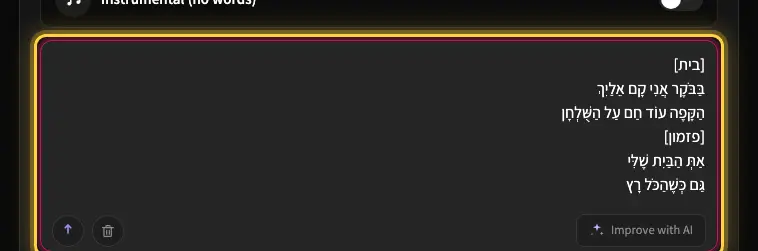
- Let Kleep add the nikud. Kleep vocalizes your lyrics automatically and spells them phonetically for the singer, so you can type plain Hebrew. Add nikud by hand only to force a rare name or a word that still comes out wrong. The Hebrew pronunciation help article shows how.
- Describe the vocal in Style. There is no voice picker: write "male vocal" or "female vocal" (plus a word like warm or soft) in the Style field, otherwise the singer's gender is matched to the lyrics. A delivery suited to the language keeps phrasing, rhythm and stress aligned with how the words are actually spoken.
- Keep sentence structure conversational. Short, natural phrases with a clear rhythm sing better than long, formal, or literary sentences.
- Compare both versions. Every creation already returns two versions, and pronunciation varies between them even with identical lyrics. Listening to both and keeping the cleaner one is a simple, reliable improvement.
Choosing the right voice for the song
Vocal style matters as much as the lyrics themselves. Since there is no voice picker, you set it in the Style field (see styles and voices). A vocal description and genre that suits the language and the mood of the song produces noticeably cleaner pronunciation than forcing a mismatched style onto Hebrew lyrics. A slower, warmer style generally gives a singing voice more room to shape each syllable clearly, while very fast or heavily processed styles can blur pronunciation regardless of language.
If a specific line comes out sounding off, note that there is no way to regenerate a single line: every new creation regenerates the whole song and costs 5 credits. So rewrite that line in the lyrics box (Advanced mode) before you generate again - rephrase it with more natural word order, or swap a word that has multiple possible pronunciations.
So, does it actually work?
Yes, with the right approach. Hebrew AI singing has improved dramatically, and songs generated with natural Hebrew lyrics, automatic nikud and a well-matched vocal style come out sounding genuinely natural - not a novelty, but something you would actually want to listen to and share.
Ready to hear it for yourself? Try the Hebrew AI song generator and generate a song using the tips above, or read every layer Kleep adds to make Hebrew sing naturally. Before you share, run through the Hebrew song generator checklist. The same rules matter even more for prayers and piyyutim, covered in religious music with AI in Hebrew.
Frequently asked questions
Why does AI mispronounce Hebrew words that end in ayin or het?
Words like רגע or נוגע end with a furtive patach, a short, constricted vowel-plus-guttural sound that native speakers produce automatically. Models trained mostly on other languages have rarely heard it, so they round the ending off into a plain "ah" or "eh". It is the single most common giveaway in Hebrew AI vocals, but it is a known, repeatable pattern, and better lyric preparation and a vocal style suited to Hebrew reduce it noticeably.
Should I add nikud to my lyrics before generating a Hebrew song?
Usually not. Kleep adds nikud automatically and spells the lyrics phonetically for the singer, so plain Hebrew works. Add nikud by hand only to force a rare name or a word that keeps coming out wrong, for example an unusual reading of a name like דנה. There is no need to turn your lyric sheet into a fully pointed text.
Do Hebrew lyrics translated from English sing worse than lyrics written in Hebrew?
Usually, yes. Word-for-word translation carries English sentence structure into Hebrew, which creates stress patterns and phrasing that no Israeli would actually say. The singing voice then has to fight that syntax. Lyrics composed directly in Hebrew, in short conversational phrases with a clear rhythm, sing far more smoothly than long, formal or literary lines, even when the vocabulary is identical.
Which vocal style gives the cleanest Hebrew pronunciation?
There is no voice picker; you describe the vocal in Style (for example "warm female vocal"), otherwise the singer's gender is matched to the lyrics. A slower and warmer genre generally gives the cleanest result. Slower delivery leaves room to shape every syllable, while very fast or heavily processed styles blur consonants in any language. Forcing Hebrew text through an English-leaning delivery is what produces the foreign-accent effect, so matching the vocal style to the language and mood matters as much as the words themselves.
One line in my Hebrew song sounds wrong. Do I have to regenerate the whole song?
There is no way to fix a single line: any regeneration creates the whole song again and costs 5 credits. First compare the two versions every creation returns, since pronunciation varies between them, and keep the cleaner one. If a specific line keeps coming out wrong, rewrite it before the next generation instead of rerolling the same lyrics: reorder the words into more natural Hebrew, or swap a word that has several possible readings for one that does not.
About the author
Kleep Editorial TeamAI music guides and product team
The Kleep editorial team builds and tests Kleep's AI song generator every day and writes practical, hands-on guides to creating songs with AI in English and Hebrew.
Create a song for the occasion
Keep reading
How Kleep Sings Hebrew: Every Layer Between Your Words and the Song
AI music tools were built for English. Every layer Kleep adds for Hebrew: grammar and gender checks, Dicta nikud, phonetic fixes and voice matching.
Creating Religious Music With AI: Niggunim, Piyyutim and Kodesh Songs in Hebrew
Create religious and Jewish music with AI in Hebrew: niggunim, piyyutim, Shabbat and holiday songs, with natural Hebrew pronunciation in minutes.
AI Song Composer: How to Write an Original Melody Without Knowing Any Notes
No need to read music to compose an original song. Use Kleep as your AI composer and turn a mood, theme or a few lines into a full melody in minutes.