
AI Song Composer: How to Write an Original Melody Without Knowing Any Notes
Most people who want to write a song are stopped by the same wall: they cannot read music, play an instrument, or find a melody in their head. An AI composer removes that wall entirely. You describe what you want in plain words, and Kleep builds the melody, the chords, and the arrangement for you. This guide shows how to get a result that sounds intentional rather than random.
What an AI composer actually does
A song is really three layers: the melody (the tune you hum), the harmony (the chords underneath), and the arrangement (which instruments play and how). Writing all three by hand takes years of training. An AI composer generates all three at once from your description, so you can focus on the one thing only you know - what the song is supposed to feel like.
This means the skill you actually need is not music theory. It is describing a mood clearly. Everything else is handled for you.
Step by step: composing without notes
Open the Create page and work through this (the create a song guide covers every field):
- Start from a feeling, not a genre. "Hopeful and building toward a big finish" gives the composer more to work with than just "pop." The emotion drives the melody.
- Add a reference point in words. Mention a tempo (slow, mid, driving), an instrument you love (piano, acoustic guitar, strings), and a setting (intimate, cinematic, celebration). You are describing the arrangement without needing its vocabulary.
- Provide the words, or let the tool write them. If you have lyrics, paste them in. If you do not, describe the theme and let Kleep generate lyrics that fit the melody.
- Listen to both versions. Every creation already returns two versions, each a different melodic idea (the second is saved in your Library as "Version 2"). This is the composer offering you options - pick the tune that sticks in your head.
- Refine one detail at a time. Too fast? Say slower. Too busy? Ask for a stripped-back arrangement. Small, specific changes beat starting over, and a remix keeps the new take as another version of the same song.
- Finalize the track. Every song is saved to your Library automatically. MP3 download comes with Premium, or for 30 days after buying a credit pack (credits and Premium).
How to describe a melody in words
The single biggest lever you have is the language you use. These translations from feeling to description tend to work well:
- "Simple and catchy" - fewer notes, a repeated hook, easy to sing along to.
- "Emotional and swelling" - a melody that starts low and climbs, with the arrangement growing underneath it.
- "Gentle and intimate" - sparse instruments, slower pace, a close vocal.
- "Energetic and driving" - steady rhythm, a strong beat, an uplifting chorus.
You do not need to name a single chord. You just need to know what the song should make someone feel, and say it clearly.
Have a tune in your head? Hum it
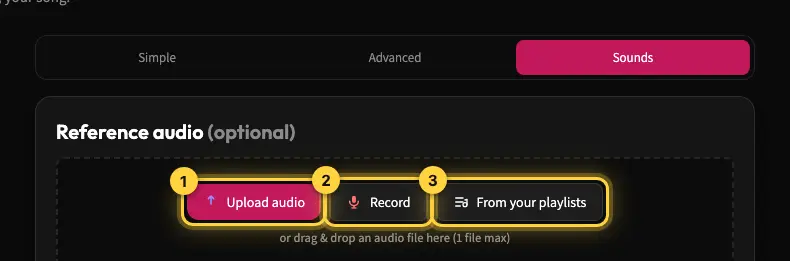
If you already hum a melody but cannot write it down, switch to Sounds mode on the Create page. Tap Record, hum or sing the idea into your microphone (or upload a short clip), and choose "Influence sound & style" so the result follows your idea. Your humming becomes the reference; Kleep builds the full song around it.
Common mistakes when composing this way
- Being too vague. "Make a good song" gives the composer nothing to aim at. One clear mood word changes everything.
- Changing everything at once. If you rewrite the lyrics, the style, and the tempo together, you cannot tell what improved. Change one thing per take.
- Stopping at the first creation. The first creation is a draft. Compare its two versions, then refine.
Start composing today
You do not need to read a single note to write an original song. Describe the feeling, let Kleep compose the melody and arrangement, and refine from there. Want the music without a singer? See how to make an instrumental or karaoke track.
Frequently asked questions
Can I compose an original song if I cannot read music or play an instrument?
Yes. An AI composer generates the three layers of a song, the melody, the chords underneath, and the arrangement of instruments, from a plain-language description. The skill you actually need is describing a mood clearly, not music theory. You say what the song should feel like, add a tempo, an instrument you like, and a setting, and the composer handles notation, harmony, and playing entirely.
How do I describe a melody in words when I do not know musical terms?
Translate feeling into plain phrases. "Simple and catchy" gets you fewer notes and a repeated hook that is easy to sing along to. "Emotional and swelling" gives a melody that starts low and climbs while the arrangement grows. "Gentle and intimate" means sparse instruments, a slower pace, and a close vocal. "Energetic and driving" brings a steady rhythm, a strong beat, and an uplifting chorus. You never need to name a chord.
Should I start my prompt with a genre or with a feeling?
Start with a feeling. "Hopeful and building toward a big finish" gives the composer far more to work with than just "pop," because the emotion is what drives the melody. Then add reference points in everyday words: a tempo such as slow, mid, or driving, an instrument such as piano, acoustic guitar, or strings, and a setting such as intimate, cinematic, or celebration. That describes the arrangement without its vocabulary.
Do I need to write lyrics before the AI can compose a melody?
No. If you already have lyrics, paste them in and the melody will be built around them. If you do not, describe the theme and let Kleep generate lyrics that fit the tune. Either way the melody, harmony, and arrangement are produced together from your description, so the words and the music arrive matched rather than forced together afterwards.
Why does my AI song sound random, and how do I fix it?
Usually because the prompt was vague or because too much changed at once. "Make a good song" gives the composer nothing to aim at; one clear mood word changes everything. Treat the first creation as a draft, compare the two versions it returns, and pick the tune that sticks in your head. Then refine one detail per take: too fast, ask for slower; too busy, ask for a stripped-back arrangement.
How many versions should I generate before choosing a melody?
Start with one creation: it already returns two versions, each a different melodic idea, so you get options rather than one fixed answer. Each creation costs 5 credits. If neither version sticks, adjust one detail of the description and create again. Once a melody sticks, stop regenerating from scratch and make small, specific adjustments instead.
About the author
Kleep Editorial TeamAI music guides and product team
The Kleep editorial team builds and tests Kleep's AI song generator every day and writes practical, hands-on guides to creating songs with AI in English and Hebrew.
Keep reading
How Kleep Sings Hebrew: Every Layer Between Your Words and the Song
AI music tools were built for English. Every layer Kleep adds for Hebrew: grammar and gender checks, Dicta nikud, phonetic fixes and voice matching.
Creating Religious Music With AI: Niggunim, Piyyutim and Kodesh Songs in Hebrew
Create religious and Jewish music with AI in Hebrew: niggunim, piyyutim, Shabbat and holiday songs, with natural Hebrew pronunciation in minutes.
Creating AI Music for Free in Hebrew: The Complete Beginner's Guide
A start-to-finish guide to creating music with AI in Hebrew for free, no experience needed. From your first prompt to a natural Hebrew song with Kleep.