
How to Turn Lyrics Into a Song With AI
You already have the words. Now you want to hear them as a real song. An AI song generator can turn lyrics into a melody, vocals, and a full instrumental arrangement without a microphone, instruments, or production software. This guide shows you how to prepare your lyrics, choose the right sound, and create a finished track with Kleep.
What does an AI lyrics-to-song generator do?
A lyrics-to-song generator reads the words and creative direction you provide, then builds music around them. It decides how the vocal line moves, where the arrangement should grow, how fast the song feels, and which instruments support the mood. The result is a complete audio track rather than a page of lyrics or a simple spoken recording.
You remain the creative director. Your lyrics provide the story, while your style description tells the generator how that story should sound. A quiet piano ballad and an energetic pop-rock anthem can use exactly the same words and feel like completely different songs.
Lyrics tell the generator what to say. Your style direction tells it how the listener should feel.
Prepare your lyrics before you generate
AI can work with a rough draft, a poem, a message, or finished lyrics. A little preparation still makes the first result much stronger. Start by dividing the text into recognizable song sections.
- Label the sections. Use markers such as [Verse 1], [Chorus], [Verse 2], and [Bridge].
- Keep the chorus focused. Build it around one short line that captures the main feeling and can be repeated.
- Read every line aloud. Shorten any line that makes you rush or run out of breath.
- Balance similar lines. Lines that sit next to each other usually sing better when their lengths are reasonably close.
- Remove stage directions from the lyrics. Put instructions such as "soft female vocal" or "bigger drums" in the style field instead.
If your draft still needs work, use our guide to writing AI song lyrics to tighten the structure, rhythm, and chorus before generating.
How to turn your lyrics into a song in Kleep
You do not need to assemble separate tools for lyrics, vocals, and music. Kleep brings them into one creation flow. Here is the quickest path from text to audio:
- Open the Create page. Switch to Advanced mode so you can paste your own words (Simple mode writes the lyrics for you from a short description).
- Paste your lyrics. Keep the section labels in place so the song has a clear verse-and-chorus shape.
- Choose the lyrics language. Select English or Hebrew so the vocal delivery follows the language you wrote; for another language, choose English and name it in the style.
- Describe the style. Add the genre, mood, energy and instruments. To choose the singer, write "male vocal" or "female vocal" in the style; otherwise the singer's gender is matched to your lyrics.
- Create the song. Kleep generates the vocals, melody, arrangement, and finished audio together. One creation costs 5 credits and already gives you two versions to compare.
- Listen and refine. If a line feels crowded or the mood is wrong, adjust the lyrics or style and create again, or remix the song (see remix and versions).
- Share the one you love. Every song is saved to your Library automatically. Share the link, and note that MP3 download comes with Premium, or for 30 days after buying a credit pack.
The first generation is a draft you can hear. Treat it as useful feedback: the moment your words are sung, you will notice which lines flow and which ones need a small edit.
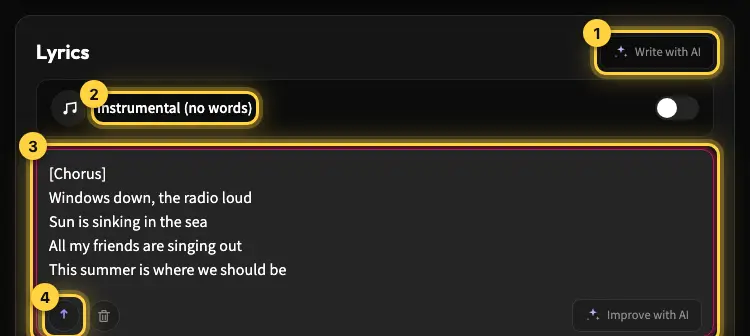
On free credits, songs with lyrics run up to about 2:30, which is roughly 230 sung words, so trim long texts or use Premium for longer songs. The lyrics help article covers the editor in detail.
Write a style prompt that fits your words
The same lyrics can support many genres, so avoid entering only a broad label such as "pop" or "rock." A useful style description combines five choices: genre, mood, tempo, instrumentation, and vocal character.
Warm acoustic folk ballad, intimate and hopeful, slow tempo, fingerpicked guitar and soft strings, expressive male vocal, gentle build into the final chorus.
That prompt gives the generator a clear emotional and musical target without dictating every note. For a faster result, swap the ingredients: upbeat synth-pop, confident mood, driving drums, bright keyboards, and an energetic female vocal.
Do not ask for the exact voice or style of a living artist. Describe the musical qualities you want instead. Our AI music prompt guide includes more formulas and examples you can reuse.
How to fix common first-generation problems
A small, targeted change usually works better than rewriting everything. Listen once for the words and once for the music, then fix the specific issue you hear.
- The singer rushes a line: remove unnecessary words or split one long line into two.
- The chorus does not stand out: shorten it, repeat the hook, and ask for a stronger lift into the chorus.
- The mood feels wrong: replace vague words such as "nice" with a precise emotion such as tender, bittersweet, triumphant, or playful.
- The arrangement feels crowded: request fewer lead instruments and a more intimate production.
- The pronunciation is unclear: simplify unusual spellings and make sure the selected lyrics language matches the text.
- The song feels generic: add one distinctive instrument, a clearer era, or a specific energy arc.
Change one or two variables at a time. If you replace the lyrics, genre, voice, tempo, and instruments together, you will not know which change improved the song.
Ideas for songs made from your own words
Your starting text does not need to look like professional lyrics. Some of the most personal AI songs begin as ordinary writing:
- A poem you wrote years ago but never set to music.
- A letter for a partner, parent, or close friend.
- A chorus or hook saved in your phone.
- A wedding speech turned into an anniversary song.
- A journal entry reshaped into verses.
- Original lyrics for a social video, podcast, or small business.
Use only words you wrote or have permission to use. Turning someone else's copyrighted lyrics into a new recording may require permission, even when the music is generated by AI.
Starting from a poem, a letter or a speech rather than song lyrics? Our guide to turning words you already wrote into a finished song shows how to find the chorus and decide what to keep exactly as written.
Turn your words into a song
You do not have to imagine how your lyrics might sound. Paste them into Kleep, choose a musical direction, and hear a complete version with melody, vocals, and instrumentation. Then refine the words with your ears instead of guessing from the page.
Ready to begin? Paste your lyrics on the Create page, or start with our broader beginner's guide to creating an AI song.
Frequently asked questions
Do I need to mark verse and chorus in my lyrics before turning them into a song?
It helps a lot. Labels such as [Verse 1], [Chorus] and [Bridge] tell the generator where the song should lift and where it should settle, so the result gets a clear verse-and-chorus shape instead of one long melody. Keep the chorus built around one short repeatable line, read every line aloud and shorten the ones that make you rush, and leave the labels in place when you paste the text.
Can AI turn a poem or a letter into a song?
Yes. The starting text does not need to look like professional lyrics. A poem you wrote years ago, a letter to a partner or parent, a journal entry or a wedding speech can all become a song. Split the text into sections first, pick the line that carries the main feeling and treat it as the chorus, then describe the mood and genre separately in the style field rather than inside the words.
Can the same lyrics work as a ballad and as an upbeat pop song?
Yes, and hearing both is a useful way to discover what the words want. The lyrics carry the story while the style description decides how it feels, so "warm acoustic ballad, slow tempo, fingerpicked guitar, expressive male vocal" and "upbeat synth-pop, driving drums, bright keyboards, energetic female vocal" give you two very different songs from the same text. Generate both and keep the one that fits the words.
What do I do when the AI singer rushes through a line?
Do not rewrite the whole song. Remove unnecessary words from that line or split one long line into two, then generate again. Lines that sit next to each other sing best when their lengths are roughly equal, so also check the line before and the line after. Change only one or two things per attempt so you can tell which edit fixed the rushing.
Why does my lyrics-to-song result sound generic?
Usually because the style description is too broad. A label like "pop" or "rock" leaves every decision to the generator, so it picks the average. Add one distinctive instrument, a clear era, a precise emotion such as bittersweet or triumphant instead of "nice", and an energy arc like a gentle build into the last chorus. If the mix feels crowded, ask for fewer lead instruments and a more intimate production.
Can I turn someone else's lyrics into an AI song?
Only with permission. Turning copyrighted lyrics into a new recording may require the writer's consent even when the music itself is generated by AI, so stick to words you wrote or have been cleared to use. The safest material is your own: a hook saved on your phone, a letter, or a poem from your notebook. If you do want someone else's text, get written permission before you generate.
About the author
Kleep Editorial TeamAI music guides and product team
The Kleep editorial team builds and tests Kleep's AI song generator every day and writes practical, hands-on guides to creating songs with AI in English and Hebrew.
Keep reading
How Kleep Sings Hebrew: Every Layer Between Your Words and the Song
AI music tools were built for English. Every layer Kleep adds for Hebrew: grammar and gender checks, Dicta nikud, phonetic fixes and voice matching.
Creating Religious Music With AI: Niggunim, Piyyutim and Kodesh Songs in Hebrew
Create religious and Jewish music with AI in Hebrew: niggunim, piyyutim, Shabbat and holiday songs, with natural Hebrew pronunciation in minutes.
AI Song Composer: How to Write an Original Melody Without Knowing Any Notes
No need to read music to compose an original song. Use Kleep as your AI composer and turn a mood, theme or a few lines into a full melody in minutes.