
Royalty-Free Music for YouTube & TikTok: Create Your Own Signature Sound in Minutes
If you make content for YouTube or TikTok, you already know the fear: you upload a video you spent hours editing, and minutes later a copyright claim mutes your audio or hands your ad revenue to someone else. The usual fixes are frustrating - overused royalty-free libraries everyone recognizes, murky licensing terms, or tracks that quietly change their rules months later. There is a better path. With Kleep you can generate original music, with commercial use allowed on every plan, and drop it into your next post within minutes. This guide walks through why copyright strikes happen, what royalty-free really means, and exactly how to create a signature sound of your own.
Why copyright strikes happen (and how to lower the risk)
YouTube and TikTok both run automated fingerprinting systems that scan every upload against a massive database of registered recordings. If your video contains audio that matches a track someone else owns - even a few seconds of it, even in the background - the system can flag it automatically. That flag can mute your video, block it in some countries, or redirect any earnings to the rights holder.
The trap is that many creators believe a song is safe simply because it was labelled free somewhere. But free to download is not the same as cleared for monetized use, and popular free tracks are so widely reused that platforms sometimes misfire on them anyway. Music generated fresh for your video avoids the most common cause of claims.
- Matched third-party audio: the most common cause - a recognizable song, sample, or loop the platform already knows.
- Ambiguous licenses: a track was free last year but its terms changed, or the license never covered ad revenue.
- Over-shared library tracks: the same trending free loop used by thousands of videos, raising your risk of a false match.
- Sampled or remixed material: stems that secretly contain a protected recording underneath.
A track that did not exist until you generated it avoids the most common cause of claims: matching a recording that is already sitting in someone's catalog.
What royalty-free actually means
Royalty-free does not mean the music costs nothing. It means that once you have the right to use a track, you do not owe ongoing per-play or per-view royalties every time your video is watched. You pay or generate once, and then you use it as agreed without a meter running in the background.
The critical detail is clarity. A track you generate yourself with Kleep is created fresh from your prompt, so you are not reusing a library loop that thousands of other videos already carry, and there is no confusing patchwork of terms to decode. Kleep assigns you any rights it holds in your songs, and commercial use is allowed on every plan, including free credits. Purely AI-generated music may not be protected by copyright, and uniqueness is not guaranteed (terms). For the full picture, read our guide to commercial use of AI music.
Create your own sound in a few minutes
Here is the honest reality: making an original track used to require a studio, an instrument, or a producer on retainer. Now it takes a sentence. Head to the create page, describe the vibe you want, and let the generator do the heavy lifting.
- Open the create page and choose whether you want lyrics or a purely instrumental backing track.
- Describe the mood in plain words - for example, upbeat lo-fi for a cooking reel, or tense cinematic build for a gaming montage.
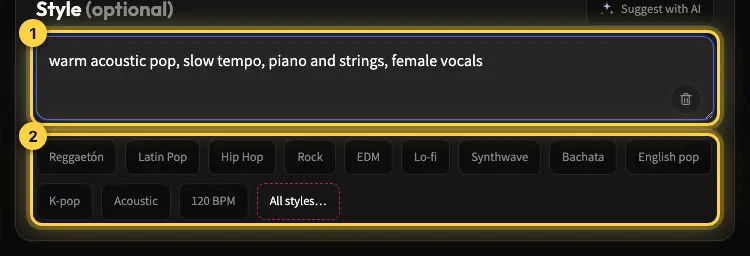
- Add a genre or a couple of style chips to steer the sound: chill, energetic, epic, retro, whatever fits your edit. Our prompt writing guide has ready-made recipes.
- Generate, then listen back. Each creation costs 5 credits and returns two versions, so the 10 free credits you get at sign-up already give you two songs to compare.
- Download the MP3 and drop it into your YouTube or TikTok timeline. MP3 download comes with Premium, or for 30 days after buying a credit pack (credits and Premium).
Because every track is generated fresh from your prompt, you are not leaning on the same three trending loops everyone else uses. That is the difference between blending in and having a sound your audience starts to recognize as yours.
Build a signature sound, not just a single track
A recognizable sonic identity is one of the most underrated growth tools on short-form platforms. When viewers hear the same style of intro or the same warm pad under your voiceover, they start to associate that feeling with your channel before they even see your face.
You can build that identity deliberately. Keep a short prompt recipe that captures your brand - the tempo, the mood, the instruments - and reuse it so every new track feels like part of the same family. Browse the explore page for inspiration when you want to evolve the sound without losing the thread.
- Reuse a consistent set of style tags so your videos feel cohesive.
- Keep one high-energy variant for hooks and one calmer variant for storytelling segments.
- Save the tracks you love and build a small library you can pull from on a deadline.
- Refresh the palette every season so your sound grows with your channel instead of going stale.
Tips to make your music land on YouTube and TikTok
Match the energy to the first three seconds
Short-form viewers decide almost instantly whether to keep watching. Generate a track whose opening moment hits hard enough to hold attention, then let it settle. A strong first bar does more for retention than a perfect bridge.
Leave room for your voice
If you talk over your videos, ask for a more minimal, less busy arrangement so your voiceover stays clear. A track that fights your narration will hurt watch time even if it sounds great on its own.
Keep length and loops in mind
For a 15 to 60 second clip you rarely need a full song. A tight, loopable section often works better and cuts cleanly. Kleep has no length control, so pick the stronger of the two versions and trim the section you need in your editor. For Reels-specific tips, see AI music for Instagram Reels.
Start creating today
Original audio avoids the most common cause of copyright claims and the generic stock music problem. Instead of gambling on a library track that thousands of others are already using, spend a few minutes making something original that fits your video and that you can use commercially.
Ready to hear your own sound? Jump to the create page and generate your first track now, check the pricing page to see how far a plan goes, or read more tips on the blog. Your next video deserves a sound of its own.
Frequently asked questions
Can I use AI-generated music in a monetized YouTube video?
Yes. Kleep allows commercial use on every plan, including free credits. Copyright claims come from fingerprinting systems matching your audio to a registered recording someone else owns. A track generated fresh from your own prompt avoids the most common cause of claims, though no tool can promise a platform will never misfire. Keep the file and the song link so you can show where the audio came from if asked.
Why did I get a copyright claim on a song labelled royalty-free?
Free to download is not the same as cleared for monetized use. The most common causes are a license that never covered ad revenue, terms that changed after you downloaded the track, a popular free loop reused in thousands of videos that triggers a false match, or a remix that secretly contains a protected recording underneath. Over-shared library music is risky precisely because platforms already know it. Freshly generated original audio avoids the most common of these causes.
What does royalty-free music actually mean?
Royalty-free means you do not owe ongoing per-play or per-view royalties every time your video is watched. It does not mean the music is free of cost or free of restrictions. You pay or generate once and then use the track under the agreed terms with no meter running in the background. For a track you generate in Kleep, Kleep assigns you any rights it holds and allows commercial use on every plan, but purely AI-generated music may not be protected by copyright and uniqueness is not guaranteed.
How long should background music be for a TikTok or YouTube Short?
For a 15 to 60 second clip you rarely need a full song. A tight, loopable section that starts strong usually works better and cuts cleanly in the editor. Short-form viewers decide within the first three seconds, so generate a track whose opening moment hits hard, then let it settle. Each creation gives you two versions; pick one and trim the section you need in your editor, since Kleep does not set an exact length.
How do I generate music that does not drown out my voiceover?
Ask for it in the prompt: a minimal, less busy arrangement with no lead vocal leaves space for narration. A track that fights your voice hurts watch time even if it sounds great on its own. A practical approach is to keep two variants of your signature sound, one high-energy version for hooks and intros and one calmer version for storytelling segments where you are talking, and to test the mix on phone speakers before publishing.
How do I build a recognizable signature sound for my channel?
Keep a short prompt recipe that defines your brand - tempo, mood and two or three instruments - and reuse it so every new track feels like part of one family. Reuse a consistent set of style tags, save the tracks you love into a small library you can pull from on a deadline, and refresh the palette each season so the sound grows with the channel. Viewers start associating that feeling with you before they see your face.
About the author
Kleep Editorial TeamAI music guides and product team
The Kleep editorial team builds and tests Kleep's AI song generator every day and writes practical, hands-on guides to creating songs with AI in English and Hebrew.
Keep reading
Free AI Music for Commercial Use: Where to Get It and What You Can Do With It
Is free AI music safe for your business videos, ads and content? This guide explains commercial use plainly and shows how to make original tracks with Kleep.
How to Create Music for a Commercial Without Paying for a Studio
Produce social and web ad music with AI: match your brand and ad length, use it commercially, and skip the studio. A practical step-by-step guide.
Music for a Corporate Promo Video: How to Choose and Create a Custom Soundtrack
Score your company profile video: match music to your brand values, sync it to scenes and narration, skip generic stock music, and use it commercially.