
Free AI Music for Commercial Use: Where to Get It and What You Can Do With It
Creators and small businesses want the same thing: music they can actually use in a video, an ad, or a store playlist without a copyright strike or a lawyer's letter. "Free music" from random sites often comes with fine print that makes it unusable commercially. The cleaner path is to generate your own original track. This guide explains what commercial use really means and how to create music you are allowed to use commercially.
Why "free music" online is a trap for businesses
Most free music you find through a search is free to listen to, not free to use in a commercial project. The difference matters. Common problems include:
- Attribution requirements - some "free" tracks demand a visible credit, which is awkward in an ad or a store.
- Non-commercial-only licenses - the track is free for a personal video but not for anything that promotes a business.
- Content-ID claims - popular free tracks are used by thousands of people, so platforms may flag or monetize your video for someone else.
- Unclear ownership - if you cannot prove where the music came from, you cannot safely build a brand on it.
For a business, a track that might get pulled next month is worse than no track at all.
The cleaner path: generate your own original music
When you create a song with Kleep, it is an original track made for you, not a shared library file that thousands of others are also using. That avoids the problem businesses care about most: there is no crowd of other creators uploading the same library file. (No AI generator can guarantee a track is one of a kind, so listen before you publish.)
You can start for free: the 10 credits you get at sign-up cover two creations, and each creation returns two versions. Kleep assigns you any rights it holds in your songs, and commercial use is allowed on every plan, including free credits. Purely AI-generated music may not be protected by copyright, and uniqueness is not guaranteed (terms). MP3 download comes with Premium, or for 30 days after buying a credit pack (see credits and Premium and pricing).
Step by step: an on-brand track in minutes
- Open the free AI song generator. Start creating without any upfront cost.
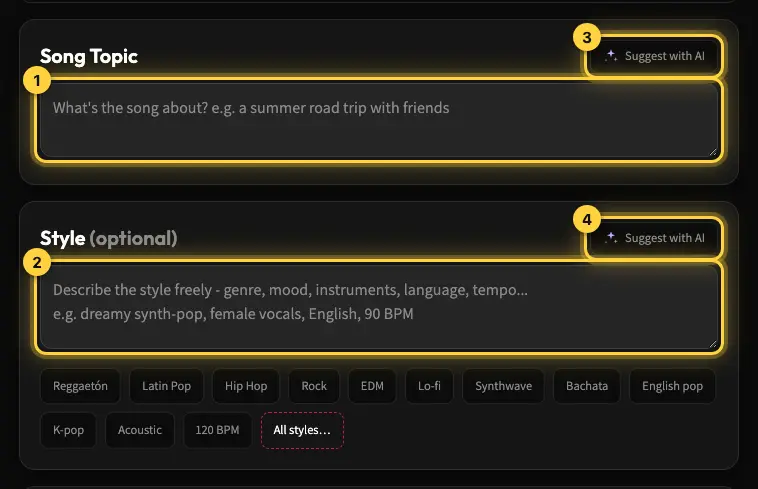
- Describe your brand's vibe. "Warm and welcoming" for a cafe, "clean and modern" for a tech product, "energetic" for a fitness reel. The mood should match how you want customers to feel. See styles and voices for how the Style field works.
- Keep it instrumental if it plays under a voiceover. Background music for an ad or store usually works best without lyrics competing with the message.
- Plan for the length. Free songs with lyrics run up to about 2:30; Premium allows longer tracks for a store playlist or a corporate video, and you can trim a clip for a reel in your video editor.
- Compare the two versions. Each creation costs 5 credits and returns two versions. Small changes to the description shift the whole feel.
- Download and use it. MP3 download comes with Premium, or for 30 days after buying a credit pack. Drop the file into your video, ad, or playlist.
Where businesses use it
- Social ads and reels - an original track instead of an over-used library loop (YouTube and TikTok guide).
- Product and explainer videos - background music matched to your brand tone (corporate video music).
- Store and cafe playlists - original music instead of a licensed radio feed (music for restaurants and shops).
- Podcasts and intros - a signature sound for your show (podcast background music).
Create your first track
Stop gambling on free music that might get pulled. Create an original track today with the free AI song generator, and when you need the file, Premium or a credit pack unlocks the MP3 download.
Frequently asked questions
What counts as commercial use of music for a small business?
Any use that promotes a business or earns money: a paid social ad, a product or explainer video, a reel on a business account, a podcast with sponsors, or the playlist in a cafe or store. A personal video for friends is not commercial; the same video used to sell something is. Licenses treat these cases differently, so a track that is free for a home project can be off-limits the moment it appears in an ad.
Is free music I found online safe to put in a paid ad?
Usually not without reading the fine print. Most "free" tracks are free to listen to, not free to use commercially: many carry non-commercial-only licenses, some demand a visible credit, and popular ones are used by thousands of channels, so Content ID may flag or monetize your ad for someone else. If you cannot document where the music came from and what its license allows, it is not a safe foundation for a campaign.
Does attribution-required free music work for ads and store playlists?
Rarely. An attribution license requires a visible credit to the composer, which is impractical in a 15-second ad, impossible in a shop playlist, and awkward in a product video. Skipping the credit breaks the license, so the "free" track becomes unlicensed. For anything customer-facing, choose music that needs no attribution at all: either a paid license that waives it, or an original track you generated yourself and therefore have nothing to credit.
Is music made on a free AI plan cleared for commercial use?
Usage rights come from the service's terms, not from the generator being free. In Kleep commercial use is allowed on every plan, including free credits, and Kleep assigns you any rights it holds in your songs. Purely AI-generated music may not be protected by copyright, and uniqueness is not guaranteed. MP3 download comes with Premium, or for 30 days after buying a credit pack.
How do I get AI background music that matches my brand's tone?
Describe how you want customers to feel, not a genre: "warm and welcoming" for a cafe, "clean and modern" for a software product, "energetic" for a fitness reel. Ask for an instrumental if the track plays under a voiceover, so no lyrics compete with the message, and plan for length: free songs with lyrics run up to about 2:30, Premium allows longer tracks for a store playlist or corporate video, and a reel can use a trimmed clip. Each creation returns two versions, so you can compare them side by side.
How do I show where the music in my business video came from if a platform asks?
Keep a paper trail from the start. Save the generated song in your account rather than deleting it, keep the downloaded file with its original name and date, and take a screenshot or note of the terms at the time you used the track. Because the track was generated for you rather than pulled from a shared library, that record shows a clear origin, which is exactly what a dispute or a Content ID review asks for.
About the author
Kleep Editorial TeamAI music guides and product team
The Kleep editorial team builds and tests Kleep's AI song generator every day and writes practical, hands-on guides to creating songs with AI in English and Hebrew.
Keep reading
How to Create Music for a Commercial Without Paying for a Studio
Produce social and web ad music with AI: match your brand and ad length, use it commercially, and skip the studio. A practical step-by-step guide.
Music for a Corporate Promo Video: How to Choose and Create a Custom Soundtrack
Score your company profile video: match music to your brand values, sync it to scenes and narration, skip generic stock music, and use it commercially.
How to Create Meditation, Sleep, and Focus Music with AI (A Practical Guide)
What makes calm ambient music work and how to prompt AI for meditation, sleep and focus tracks: long, loopable and royalty-free.