
How to Create Music for a Commercial Without Paying for a Studio
Every effective ad has a sound. The right music sets the mood in the first second, carries your message under the voice-over, and lands the punchline before the logo appears. For decades that meant hiring a composer, licensing a track, or booking studio time - expensive, slow, and locked behind approvals. With AI you can produce original ad music yourself in minutes, ready for social and web ads, matched to your brand and trimmed to the length you need. This guide shows you how to do it well.
What ad music actually has to do
Commercial music is not background filler. It works alongside a voice-over, a product shot, and a call to action, and it has to support all three without competing with them. A good ad bed leaves room for the message while still setting a clear emotional tone.
Before you generate anything, be clear about the job the music is doing:
- Set the mood fast - viewers decide how they feel about your ad in the first two seconds.
- Sit under the voice - the music should never fight the narrator or drown a key line.
- Match the brand - a premium skincare ad and a hardware-store sale should not sound the same.
- Hit the length - a 6-second bumper, a 15-second pre-roll, and a 30-second spot are three different edits.
- Drive the action - the energy should lift toward the call to action, not fade before it.
The studio bill vs. the AI way
The traditional path is expensive in both money and time. Custom composition means briefing a composer, waiting for demos, paying for revisions, and often licensing session players on top. Stock libraries are cheaper but you share the same track with thousands of other advertisers, and premium sync licenses come with usage limits and renewal fees.
The AI way removes almost all of that friction. You describe the mood, genre, and tempo, and the tool composes an original track in minutes. Each creation returns two versions; drop each one under your rough cut and keep the one that fits. With Kleep you get original music you can iterate on instantly, for a tiny fraction of what a single custom session would cost.
You are not paying for a studio anymore. You are paying for the twenty minutes it takes to try five directions and pick the best one.
Match the music to your brand and your ad length
The two most common mistakes in ad music are the wrong emotional tone and the wrong runtime. Get both right and the track will feel like it was written for the spot.
Start from the brand. Ask what one feeling the viewer should walk away with - trust, excitement, warmth, urgency - and let that choose your genre and instrumentation. Then match the structure to the format:
- 6 seconds (bumper) - one hook, one hit. No time to build, so lead with energy and end clean.
- 15 seconds (pre-roll and social) - a short rise into the message, then a clear button at the end for the call to action.
- 30 seconds (spot) - room for an intro, a build under the voice-over, and a resolved ending on the logo.
- Loops and beds - lower-energy, sparse versions that sit quietly under long-form voice-over without pulling focus.
Not sure which direction fits? Browse Explore to hear how different genres actually feel before you commit to one.
Step by step: produce your ad music with AI
Here is a workflow you can run from a blank page to a finished, voice-over-friendly bed. Open the create page and work through it:
- Lock your ad length first. Decide 6, 15, or 30 seconds before you generate, so you are choosing music for a real cut, not the other way around.
- Write a mood brief. In one line, name the feeling, the genre, the tempo, and the energy curve - for example "confident, warm acoustic pop, mid-tempo, lifting toward the end." Our prompt writing guide has more examples.
- Keep space for the voice. Ask for a track that stays sparse in the mid-range, or plan to duck the music under the voice-over in your editor.
- Compare the two versions. Each creation costs 5 credits and returns two versions. Compare them under your actual footage rather than on their own.
- Trim to the hit points. Kleep has no length setting, so align the biggest musical moment with your product reveal or call to action in your editor, and cut the track to end exactly on the logo.
- Export and mix. MP3 download comes with Premium, or for 30 days after buying a credit pack (credits and Premium). Drop the music under your voice-over, lower it during speech, and let it breathe in the gaps.
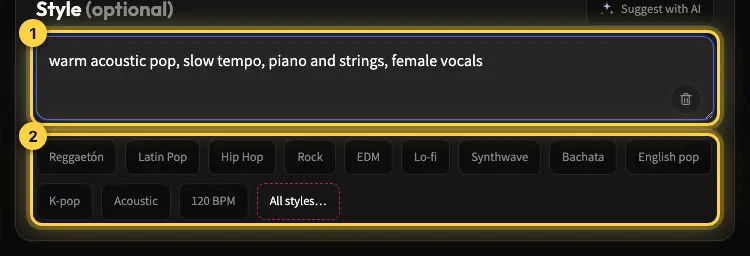
Because generating another version costs almost nothing, make a longer web edit and a square social cut from the same idea while you are at it.
Licensing, ownership, and the rights that matter
The part that trips up most advertisers is not the music, it is the paperwork. Stock and sync licenses can restrict where you run the ad, for how long, and on which platforms, and pulling a track later can mean re-editing everything. Music you create yourself reduces that risk.
When you produce ad music with Kleep, you get original tracks without hunting for cleared samples or reusing a stock library cut that other brands run. Kleep assigns you any rights it holds in your songs, and commercial use is allowed on every plan, including free credits. Purely AI-generated music may not be protected by copyright, and uniqueness is not guaranteed (terms). Keep your files so you can re-cut the same track for future spots, and see our guide to commercial use of AI music for the full picture.
A few habits keep you flexible:
- Generate original music rather than reusing a shared stock track that competitors may also run.
- Save every version you make, so you can spin off new lengths without starting over.
- Check each ad platform's own rules on music and AI-generated content before you launch.
Tips for ad music that actually converts
Great production is wasted if the music does not move the viewer toward the action. A few principles separate an ad that sounds nice from one that performs:
- Serve the message, not the music. If the track is the star, the product is not. Keep it supportive.
- Build toward the call to action. Let the energy peak where you want the click, not in the middle.
- Mind the platform. Most social ads play muted at first, so make the visuals carry, then reward sound-on viewers with a strong bed.
- Stay consistent. Reuse the same musical signature across a campaign so viewers connect the spots to your brand.
- Test two versions. Because AI production is cheap, run an A and a B track and let the numbers pick the winner.
A memorable ad sound used to be a line item only big brands could afford. Now you can produce it yourself in an afternoon. Open Kleep to create your first ad track, build a short business jingle for your sonic logo, or read about music for corporate videos.
Frequently asked questions
How long should the music for a 15-second or 30-second commercial be?
Longer than the cut, so you can trim it to end exactly on the logo; Kleep generates a full track rather than an exact length. A 6-second bumper needs one hook and one hit, a 15-second pre-roll needs a short rise into the message and a clear button at the end, and a 30-second spot has room for an intro, a build under the voice-over, and a resolved ending. Lock the ad length before you generate, then align the biggest musical moment with your product reveal or call to action.
How do I keep ad music from drowning out the voice-over?
Ask for a sparse, instrumental track that stays out of the mid-range where speech lives, then lower the music under the narration in your editor and let it rise again in the gaps. A "no vocals" instruction matters: sung lyrics fight the narrator. Compare each candidate under your actual rough cut rather than on its own, because a track that sounds great solo often turns out too busy once the voice is on top.
Is AI-generated music legal to use in a commercial?
Yes. Music you generate yourself is original, so there is no stock library license or sync fee to clear. On Kleep commercial use is allowed on every plan, including free credits, and Kleep assigns you any rights it holds; your inputs (lyrics, uploaded audio) must be yours. Purely AI-generated music may not be protected by copyright and uniqueness is not guaranteed. Check each ad platform's own policies, and keep the files so you can re-cut the track later.
What should I write in the prompt for advertising music?
One line that names the feeling, the genre, the tempo, and the energy curve, for example "confident, warm acoustic pop, mid-tempo, lifting toward the end, instrumental." Start from the single emotion the viewer should walk away with, such as trust, excitement, warmth, or urgency, and let that pick the instrumentation. Avoid vague words like "nice" or "catchy"; the more concrete the brief, the closer the first take will be.
Should I use the same music across all the ads in a campaign?
Yes. Reusing one musical signature across the 6, 15, and 30-second edits, and across the web and square social cuts, helps viewers connect each spot to your brand. Generate the variations from the same style description so they share the same DNA, and save every version. If you want to test, run an A and a B track on the same creative and let the results decide.
Does ad music matter if most social ads play muted?
It does, because the viewers who turn sound on are the most engaged ones, and the music is what carries them to the call to action. Design the ad so the visuals and captions work silently, then reward sound-on viewers with a strong bed that peaks exactly where you want the click. Never let the music fade before the call to action; the energy should lift toward it.
About the author
Kleep Editorial TeamAI music guides and product team
The Kleep editorial team builds and tests Kleep's AI song generator every day and writes practical, hands-on guides to creating songs with AI in English and Hebrew.
Keep reading
Free AI Music for Commercial Use: Where to Get It and What You Can Do With It
Is free AI music safe for your business videos, ads and content? This guide explains commercial use plainly and shows how to make original tracks with Kleep.
Music for a Corporate Promo Video: How to Choose and Create a Custom Soundtrack
Score your company profile video: match music to your brand values, sync it to scenes and narration, skip generic stock music, and use it commercially.
How to Create Meditation, Sleep, and Focus Music with AI (A Practical Guide)
What makes calm ambient music work and how to prompt AI for meditation, sleep and focus tracks: long, loopable and royalty-free.