
The Best AI Music for Instagram Reels, TikTok and Short-Form Video
Short-form video lives and dies by its soundtrack. The right track sets the pace, carries the emotion, and makes people watch to the end. But if you rely on the trending audio in your app's music library, you are borrowing someone else's sound - and taking on their risk. This guide explains why original AI music is the smarter foundation for Reels, TikTok and Shorts, and shows you how to make a custom, royalty-free track that fits your video perfectly in just a few minutes.
Why original AI music beats trending audio
Trending sounds feel like a shortcut, but they come with hidden costs. Popular audio gets attached to millions of videos, so your clip sounds exactly like everyone else's. Worse, licensed tracks can be muted, blocked, or age-restricted without warning - especially the moment you try to reuse the video in an ad, on your website, or across another platform.
Original AI music avoids most of this. When you generate a track with Kleep, it is a fresh piece made from your prompt, and it stays on-brand instead of chasing a trend that will feel dated in two weeks. Kleep assigns you any rights it holds in your songs, and commercial use is allowed on every plan, including free credits. Purely AI-generated music may not be protected by copyright, and uniqueness is not guaranteed (terms). Our guide to commercial use of AI music covers the details.
- Original, not borrowed - you are not reusing someone else's trending recording, and commercial use is allowed on every plan.
- Cross-platform - the same track works on Reels, TikTok, Shorts, YouTube, and paid ads without new licensing.
- On-brand - match the mood, tempo, and energy to your identity instead of a viral sound everyone recognizes.
- Royalty-free reuse - there are no per-play fees to Kleep, so you can reuse it as many times as you want.
Trending audio makes you sound like everyone else. Original music makes you sound like you.
The royalty-free advantage
This is the part most creators underestimate. When you use a track from a trending library, you are renting it under someone else's terms. Those terms can change, the sound can disappear, and you almost never have the rights to use it in a commercial context like a product launch or a client campaign.
A track you generate in Kleep is different: it is royalty-free and commercial use is allowed on every plan. Post it today, reuse it in next month's ad, layer it under a client's promo, or build an entire series around one signature sound. There are no per-play fees to Kleep, no clearance paperwork, and far less risk of a music dispute than with borrowed trending audio.
For small businesses and brands, that peace of mind is the whole game. Your audio becomes an asset you control rather than a liability you borrow.
How to match music to your video's pace and mood
Great short-form audio is not just background - it drives the edit. Before you generate anything, watch your clip once with the sound off and ask what it should feel like. Then translate that feeling into a few concrete music choices.
- Fast cuts and product demos - upbeat, punchy tempo with a clear beat so your transitions land on the rhythm.
- Calm, aesthetic, or lifestyle clips - soft lo-fi, ambient, or acoustic textures that let the visuals breathe.
- Emotional or storytelling videos - cinematic builds with a slow rise so the payoff hits when your message does.
- High-energy or fitness content - driving electronic or pop with strong momentum to keep people moving.
Tempo is your most powerful lever. If your video has quick cuts every second, a slow ballad will feel sluggish; a fast, rhythmic track makes the same edit feel intentional and tight. Match the beat to your cut points and the whole video snaps into place.
Creating short hooks and loops that grab attention
You do not need a full three-minute song for a fifteen-second video. What you need is a strong hook - the memorable part that hits in the first second and makes someone stop scrolling. Short-form audio rewards immediacy over slow build-ups.
- Front-load the energy. Ask for a track that opens with its strongest moment instead of a long intro, so the first second earns the watch.
- Keep it simple. A clean, repeatable groove loops better than a busy arrangement that fights your voiceover.
- Aim for a loopable feel. Music that can repeat without an obvious seam lets you extend or trim to any clip length.
- Leave room for your voice. If you talk over the video, choose a track with space in the mid-range so your words stay clear.
A good hook is the difference between a thumb that keeps scrolling and one that stops. Each creation gives you two versions; play each against your footage, and keep the one that makes the opening feel inevitable.
Length tips for Reels, TikTok and Shorts
Each platform has a sweet spot, and your audio should be built to fit it rather than fade out awkwardly halfway through. As a rule of thumb, make your track slightly longer than your clip so you always have room to trim to the exact cut.
- Instagram Reels - most Reels perform best between 7 and 30 seconds; keep the hook tight and the energy consistent.
- TikTok - 15 to 34 seconds is a strong range for retention, with a clear beat that supports fast transitions.
- YouTube Shorts - up to 3 minutes, so you can afford a small build, but still open strong.
Whatever the length, plan the ending. A track that resolves cleanly or loops seamlessly feels far more polished than one that gets cut off mid-note. Kleep has no length setting, so generate a full track and trim it in your editor to land on your final frame.
Step by step: make a custom track in Kleep
Here is the exact workflow to go from an idea to a video-ready, royalty-free track. It takes a couple of minutes and no music skills at all.
- Open the creator. Go to the Create page and start a new track.
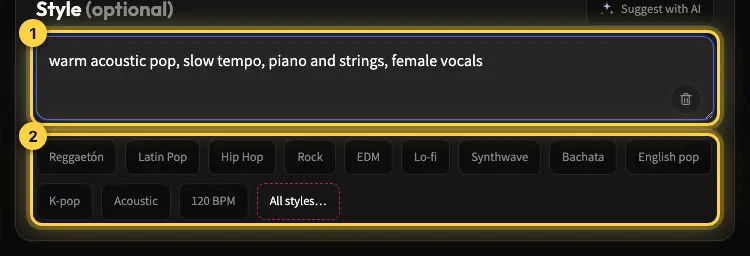
- Describe the vibe for your video. Write a prompt like "upbeat, punchy pop instrumental for a fast product Reel, energetic and modern, strong beat, no vocals."
- Match tempo and mood. Tap a style chip that fits your footage - lo-fi for calm, electronic for energy, cinematic for storytelling - and keep it instrumental if you plan to talk over it. See styles and voices for more style ideas.
- Generate and compare. Each creation costs 5 credits and returns two versions. Play each one against your video and pick the track that lands on your cut points.
- Download and drop it in. MP3 download comes with Premium, or for 30 days after buying a credit pack (credits and Premium). Add the file to your video editor and trim it to the exact clip length.
- Reuse it freely. Because commercial use is allowed on every plan and there are no per-play fees to Kleep, keep it for a whole series or a paid campaign.
That is the entire loop: describe, generate, match, and reuse. Once you have a signature sound, you can build a whole content series around it and stay instantly recognizable in the feed.
Ready to stop borrowing trending audio? Open the Create page and make your first custom track, browse the Explore page for ideas, and check the pricing options if you create a lot. With Premium you can also turn your own song into a short lyric video for a Reel. For YouTube and TikTok specifics, read royalty-free music for YouTube and TikTok.
Frequently asked questions
Why do Reels and TikToks with trending audio get muted or blocked?
Trending sounds are licensed recordings, and the license covers personal use inside the app only. The moment the clip is reused in an ad, on a business account, on your website, or on another platform, the platform can mute the audio, block it in some regions, or age-restrict the video without warning. Original music you generated yourself avoids the most common cause of these flags.
Can I use AI music on a business Instagram account or in a paid ad?
Yes. Trending library audio is usually off limits for commercial accounts and ads, which is where most creators hit a wall. A track you generate on Kleep is royalty-free and commercial use is allowed on every plan, including free credits, so the same file can run on a brand account, in a paid campaign, in a client promo, and on your site with no per-view fee, clearance paperwork, or new license for each platform.
How long should music be for a Reel, a TikTok, or a Short?
Use a track longer than the clip and trim it to the exact cut in your editor, since Kleep does not set an exact length. Most Reels perform best between 7 and 30 seconds, TikTok retention is strong between 15 and 34 seconds, and Shorts can run up to 3 minutes, which leaves room for a small build. Whatever the length, plan the ending: a track that resolves cleanly or loops without a seam feels far more polished than one cut mid-note.
What kind of music makes people stop scrolling?
A hook that hits in the first second. Ask for a track that opens with its strongest moment instead of a long intro, keep the groove simple and repeatable so it loops well, and match the tempo to your cut points: fast, rhythmic music for quick cuts and product demos, soft lo-fi or acoustic for calm lifestyle clips, a cinematic build for storytelling. Compare the two versions each creation gives you and keep the one that makes the opening feel inevitable.
How do I write a prompt for Reels background music?
Name the format, the mood, the tempo, and whether you need vocals, for example "upbeat, punchy pop instrumental for a fast product Reel, energetic and modern, strong beat, no vocals." If you talk over the video, ask for space in the mid-range so your words stay clear. Watch the clip once with the sound off first, decide what it should feel like, and translate that feeling into two or three concrete music choices.
Can I reuse the same AI track across a whole content series?
Yes, and it is a strong branding move. A signature sound that repeats across a series makes your videos recognizable in the feed the way a logo does, and because there are no per-play fees to Kleep, there is no limit on how many times you post it. Generate variations from the same prompt when you want variety, and keep the core groove the same so the series still sounds like you.
About the author
Kleep Editorial TeamAI music guides and product team
The Kleep editorial team builds and tests Kleep's AI song generator every day and writes practical, hands-on guides to creating songs with AI in English and Hebrew.
Keep reading
Free AI Music for Commercial Use: Where to Get It and What You Can Do With It
Is free AI music safe for your business videos, ads and content? This guide explains commercial use plainly and shows how to make original tracks with Kleep.
How to Create Music for a Commercial Without Paying for a Studio
Produce social and web ad music with AI: match your brand and ad length, use it commercially, and skip the studio. A practical step-by-step guide.
Music for a Corporate Promo Video: How to Choose and Create a Custom Soundtrack
Score your company profile video: match music to your brand values, sync it to scenes and narration, skip generic stock music, and use it commercially.