
The Complete Guide: How to Create Background Music for Your Podcast Using AI
Great podcasts are not just about the words - they are about the feeling. The right intro music sets the tone before you say a single sentence, and a clean outro leaves listeners wanting the next episode. For years, podcasters had two bad options: pay for expensive stock music libraries or risk copyright strikes with tracks they did not own. AI changes that completely. In this guide you will learn exactly how to create original, royalty-free background music for your podcast in minutes using tools like Kleep, and how to use it across your intro, outro, and transitions.
Why Podcast Music Matters More Than You Think
Audio branding is one of the most underused tools in podcasting. A memorable intro theme becomes a signal - within a few seconds, returning listeners know exactly what they are about to hear. Music also carries emotion that speech alone cannot: energy for a business show, warmth for a storytelling podcast, tension for true crime.
Beyond branding, music does practical work inside an episode. It smooths over hard cuts, signals a change of topic, and gives the listener's ear a short rest between dense segments. Done well, it is invisible. Done badly - or missing entirely - the episode feels flat and amateur.
Listeners may not remember your exact words, but they will remember how your show made them feel. Music is a shortcut to that feeling.
The Three Types of Podcast Music You Need
Before you generate anything, it helps to know what you are actually building. Most podcasts rely on three distinct pieces of music, each with a different job:
- Intro music - 10 to 30 seconds, high energy or clearly on-brand. It plays under your show name and hooks the listener immediately.
- Outro music - 15 to 30 seconds, usually a slightly calmer version of your theme. It plays under your call to action, credits, and sign-off.
- Transition stings - 2 to 6 seconds, short musical bumpers that separate segments, ad reads, or interview questions.
The secret to a polished show is consistency: all three should feel like they belong to the same musical family. AI makes this easy because you can generate variations from the same style prompt and keep a unified sound across every episode.
How to Create Your Podcast Music With AI, Step by Step
Here is a repeatable workflow you can follow every time you launch a new show or refresh an existing one:
- Define your show's mood in one sentence. For example: 'confident, modern tech-news podcast with a driving beat.' This becomes the backbone of your prompt.
- Open Kleep and describe the style, genre, and instruments you want. Be specific about tempo and energy - 'upbeat electronic, 120 BPM, no vocals' works far better than 'nice music.' Our prompt writing guide has more examples.
- Generate your main theme first. This is the full track that defines your sound. Each creation costs 5 credits and returns two versions; listen to both, tweak the prompt, and regenerate until it feels right.
- Create your intro by trimming the strongest 15 to 20 seconds of that theme, ideally a section with a clear build and a clean ending.
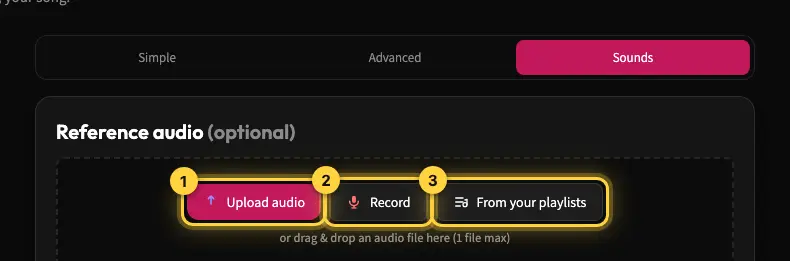
- Generate a calmer variation for your outro using the same style keywords but lower energy, so it sits comfortably under your closing words. In Sounds mode you can also use the theme as reference audio to keep the variation close.
- Cut two or three short transition stings from the theme and the outro in your editor, since Kleep generates full tracks rather than set lengths. Keep them minimal so they never fight with the spoken word.
- Download the MP3 files and drop them into your editor (MP3 download comes with Premium, or for 30 days after buying a credit pack; see credits and Premium). Set your music tracks 12 to 18 decibels below your voice so they support, not overpower.
The whole process can take under an hour, and once you have a set that works you can reuse it across an entire season.
Prompt Tips for Better Results
The quality of AI music depends heavily on how you describe it. A few habits make a big difference:
- Always specify instrumental or no vocals so lyrics do not compete with your speech.
- Name a tempo or energy level - slow and ambient, mid-tempo and warm, or fast and driving.
- Reference a genre and mood together, such as 'lo-fi hip hop, relaxed and thoughtful.'
- Ask for a clean, resolved ending if you plan to use the track as a full intro or outro.
- Browse the Explore page for styles other creators used, then adapt them to your own show.
Keep your favorite prompts in a notes file. Reusing a proven prompt is the fastest way to keep your sound consistent from episode to episode.
Rights, Licensing, and Peace of Mind
One of the biggest advantages of AI-generated music is clarity. When you create original tracks in Kleep, you are not borrowing someone else's copyrighted recording, which avoids the most common cause of the takedowns and demonetization that plague podcasters who pull music from the open web.
This matters most when you distribute across platforms and run ads. Original music travels with your show everywhere - your podcast host, YouTube, social clips - without a licensing headache following behind it. Kleep assigns you any rights it holds in your songs, and commercial use is allowed on every plan, including free credits. Purely AI-generated music may not be protected by copyright, and uniqueness is not guaranteed (terms). Our guide to commercial use of AI music goes deeper.
Start Building Your Sound Today
You do not need a composer, a studio, or a background in music theory to give your podcast a professional identity. You need a clear idea of the mood you want and a few minutes to shape it. Start with your main theme, spin out an intro, outro, and a couple of transitions, and you will have a complete audio kit that makes every episode instantly recognizable.
Ready to create your first track? Head to Kleep and describe your show. Also publishing video episodes? Read how to make an AI YouTube channel intro from the same theme.
Frequently asked questions
How long should podcast intro and outro music be?
An intro usually runs 10 to 30 seconds and plays under your show name, so it should be high energy or clearly on-brand and hook the listener immediately. An outro runs 15 to 30 seconds, typically a calmer version of the same theme, sitting under your call to action and sign-off. Transition stings are much shorter, 2 to 6 seconds, just enough to separate segments, ad reads, or interview questions.
How loud should background music be under a podcast voice?
Set the music track roughly 12 to 18 decibels below your voice so it supports the speech instead of competing with it. Keep transition stings minimal for the same reason. Choosing instrumental music with no vocals helps a lot, because sung lyrics fight the spoken word no matter how low you mix them. Listen back on earbuds and in a car before publishing, since quiet beds can disappear on small speakers.
How do I keep my intro, outro, and transitions sounding like one show?
Generate the main theme first, then create every other piece from the same style prompt with only the energy changed. Trim the strongest 15 to 20 seconds of the theme for the intro, ask for a lower-energy variation for the outro, and pull two or three short stings from the same palette. Save the prompt that worked in a notes file so next season's refresh still sounds like the same show.
What should I write in the prompt for podcast music?
Start with your show's mood in one sentence, for example "confident, modern tech-news podcast with a driving beat," then add the genre, tempo or energy, and a few instruments. Always specify instrumental or no vocals, name an energy level such as slow and ambient or fast and driving, pair a genre with a mood, and ask for a clean, resolved ending if the track will be a full intro or outro.
Will AI podcast music get flagged by YouTube or my podcast host?
Original music you generate yourself is not someone else's copyrighted recording, which avoids the most common cause of takedowns and demonetization for shows using tracks pulled from the open web. Commercial use is allowed on every Kleep plan, including free credits. Kleep does not guarantee that generated music is unique, so no tool can promise a claim will never happen. The same theme travels with the show to your podcast host, YouTube, and social clips without a license following behind. MP3 download comes with Premium, or for 30 days after buying a credit pack.
Can I create the full set of podcast music in one sitting?
Yes. With a clear one-sentence mood and a specific prompt, the main theme, a trimmed intro, a calmer outro, and two or three transition stings can all be done in under an hour, including a few regenerations to get the theme right. Once the set works, reuse it across a whole season and only refresh it when the show's direction changes.
About the author
Kleep Editorial TeamAI music guides and product team
The Kleep editorial team builds and tests Kleep's AI song generator every day and writes practical, hands-on guides to creating songs with AI in English and Hebrew.
Keep reading
Free AI Music for Commercial Use: Where to Get It and What You Can Do With It
Is free AI music safe for your business videos, ads and content? This guide explains commercial use plainly and shows how to make original tracks with Kleep.
How to Create Music for a Commercial Without Paying for a Studio
Produce social and web ad music with AI: match your brand and ad length, use it commercially, and skip the studio. A practical step-by-step guide.
Music for a Corporate Promo Video: How to Choose and Create a Custom Soundtrack
Score your company profile video: match music to your brand values, sync it to scenes and narration, skip generic stock music, and use it commercially.