
How to Create a Custom Intro Song and Sonic Logo for Your YouTube Channel
The best YouTube channels are recognizable in the first two seconds - before a single word is spoken. That instant recognition almost always comes from sound: a short musical sting, a familiar intro theme, a sonic logo your audience learns by heart. If you have ever wondered how to make an intro song for your YouTube channel that feels professional and that you can reuse on every upload, this guide walks you through the whole process, from why it matters to pressing generate in Kleep.
Why an intro theme builds brand recall
Sound is one of the fastest ways the human brain recognizes a brand. Think of the channels you love: chances are you can hum their intro. That is not an accident. A consistent audio signature trains your viewers to feel at home the moment your video starts, and that familiarity is what turns a casual viewer into a subscriber.
A custom intro does three things at once. It signals that the content is about to begin, it sets the emotional tone for the video, and it stamps every upload with your identity. When the same theme plays at the top of every video, your channel starts to feel like a real brand instead of a random collection of clips.
People forget titles and thumbnails, but they remember how a channel sounds. A strong intro is the cheapest brand asset you will ever have.
The right length: a sting, a theme, and an outro
Length is where most creators get it wrong. A long, self-indulgent intro is the fastest way to lose a viewer in the first five seconds. Think in three sizes and use each one on purpose:
- The sonic logo (3 to 8 seconds) - a tiny sting or motif that plays under your logo animation. This is your audio signature, the shortest and most repeatable piece.
- The full intro theme (10 to 15 seconds) - a slightly longer piece for the opening sequence, with room for a hook that viewers start to anticipate.
- The outro theme (15 to 30 seconds) - a warmer, calmer version that plays over your end screen while you ask people to subscribe.
The trick is that all three should feel like the same family. The sonic logo is usually a compressed version of the main theme, so a viewer hears the same melodic idea whether they catch three seconds or fifteen. That repetition across formats is exactly what cements recall.
Match the music to your niche and personality
Your intro should sound like the content that follows it. A calm, warm theme in front of a high-energy gaming montage feels wrong, and viewers feel that mismatch instantly even if they cannot name it. Start by describing your channel in two or three words, then translate that into sound.
Quick niche-to-sound examples
- Tech and reviews - clean, modern electronic textures, crisp synths, a confident and precise feel.
- Gaming and hype - driving drums, bold bass, an energetic and playful edge.
- Cooking, lifestyle, and vlogs - warm acoustic or soft lo-fi, friendly and relaxed.
- Education and business - understated, focused, a subtle motif that gets out of the way of your voice.
- Kids and family - bright, bouncy, cheerful melodies that are easy to remember.
The goal is not to be the loudest. It is to be recognizably you. A quiet channel with a gentle signature theme can build just as much recall as a loud one, as long as the sound is consistent and honest to the content.
Consistency is the whole point
A sonic logo only works if you use it every single time. The value comes from repetition, so the discipline of putting the same theme on every video is more important than making the perfect theme. Pick something good, commit to it, and let familiarity do the work over dozens of uploads.
That said, you can refresh without breaking recognition. Keep the core melody and instrument identity the same, then create seasonal or series variations - a mellow version for tutorials, a punchier version for announcements. Because they share the same musical DNA, viewers still recognize the channel while you keep things fresh.
Step by step: create your intro in Kleep
Here is the exact path from an idea to a finished intro theme and sonic logo you can drop into your editor.
- Open the creator. Go to the Create page and start a new track.
- Describe your channel sound. Write a prompt built from your niche, such as "punchy electronic intro theme for a tech review channel, confident and modern, crisp synths, no vocals, high energy." See styles and voices for more phrasing ideas.
- Keep it instrumental with a strong opening. Switch on instrumental and ask for a theme that hits from the first bar. Kleep generates a full track rather than a set length, so you will cut the intro from it in your editor.
- Generate and compare. Each creation costs 5 credits and returns two versions. Listen back to back and pick the melody that is easiest to hum after one play.
- Make the sonic logo. In your editor, trim a 3 to 8 second sting from the strongest motif of the winning theme for your logo animation.
- Download and cut. Download the MP3 of the theme and the outro variation and cut your intro, outro and sting in your video editor. MP3 download comes with Premium, or for 30 days after buying a credit pack (credits and Premium).
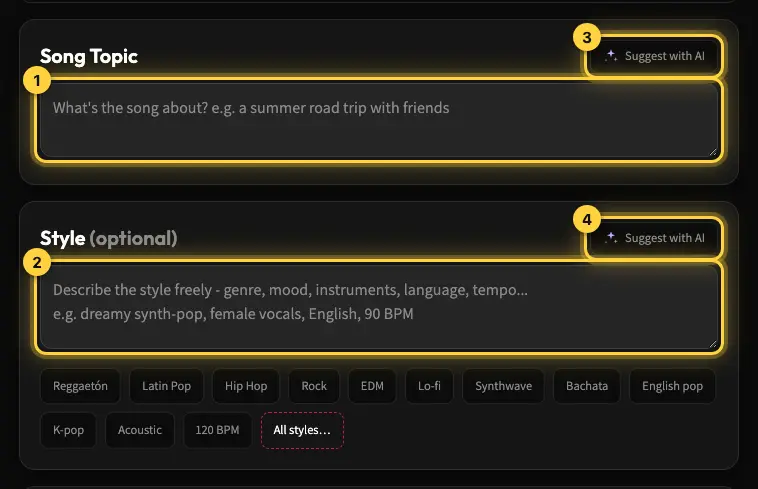
Browse the Explore page if you want inspiration for textures and moods before you start, then bring your favorite ideas back into your own prompt.
Royalty-free music instead of borrowed tracks
This is the part that saves creators the most headaches. When you pull a popular song into your intro, you risk a copyright claim that can demonetize the video or take down the audio entirely. Building your own theme avoids borrowing someone else's recording. Kleep assigns you any rights it holds in your songs, and commercial use is allowed on every plan, including free credits. Purely AI-generated music may not be protected by copyright, and uniqueness is not guaranteed (terms). The full picture is in our guide to commercial use of AI music.
- No borrowed recording - you are not relying on a third party's license, which avoids the most common cause of claims.
- Reusable across your whole channel - use the same theme on every upload, with no per-play fees to Kleep.
- Commercial use included - allowed on every plan, including monetized videos.
- Consistent - build your whole channel sound around one theme and its variations.
A great channel intro is not a luxury reserved for big studios. It is a short, repeatable piece of sound that you can create in a few minutes and reuse on every upload. Open the Create page, describe your channel in one sentence, and press generate. If you plan to build a full set of themes and variations, check the pricing options for more credits. Premium can also turn your own song into a short lyric video, and if you run a show, our guide to podcast background music covers intros, outros and stings for audio.
Frequently asked questions
How long should a YouTube intro be?
Short. A sonic logo of 3 to 8 seconds plays under your logo animation and is the most repeatable piece. A full intro theme of 10 to 15 seconds opens the video with a hook viewers learn to anticipate. The outro can run 15 to 30 seconds over your end screen. Anything longer and self-indulgent loses viewers in the first five seconds, so keep the sting tight and let the outro be the roomy one.
What is a sonic logo and how is it different from an intro song?
A sonic logo is a tiny sting or motif, usually 3 to 8 seconds, that plays under your logo and works as your audio signature. The intro theme is the longer piece, 10 to 15 seconds, that opens the video. The sonic logo is normally a compressed version of the main theme, so whether a viewer catches three seconds or fifteen they hear the same melodic idea, and that repetition across formats is what cements recall.
Will a custom AI intro get a copyright claim on YouTube?
Copyright claims usually come from using someone else's recording, which can demonetize a video or strip its audio. An intro generated for you is original rather than borrowed from a rights holder, and commercial use is allowed on every Kleep plan, including on every monetized upload. Kleep does not guarantee that generated music is unique, so no tool can promise a claim will never happen, but you avoid the most common cause.
What music style fits my channel niche?
Describe the channel in two or three words and translate that into sound. Tech and reviews suit clean, modern electronic textures and crisp synths. Gaming wants driving drums and bold bass. Cooking, lifestyle, and vlogs sit well with warm acoustic or soft lo-fi. Education and business need an understated motif that stays out of the way of your voice. Kids and family content works with bright, bouncy melodies that are easy to remember.
How do I make an intro theme and a sonic logo that match?
Generate the full theme first, keep it instrumental, and pick the melody that is easiest to hum after one play. Then trim a 3 to 8 second sting from the same core motif in your editor for the logo animation, and generate a warmer, calmer variation for the outro. Because all three share the same melodic DNA, viewers recognize the channel whichever piece they hear, and you can add seasonal or series variations later without breaking recognition.
What should the prompt for a YouTube intro sting say?
Build it from your niche, length, and feel, for example "a short punchy electronic intro sting for a tech review channel, confident and modern, crisp synths, no vocals, high energy." Ask for an instrumental theme with a strong opening, then compare the two versions each creation gives you. Kleep has no length setting, so trim the sting in your editor. Once you have a winner in Kleep, save the full intro, the outro variation, and the sting together.
About the author
Kleep Editorial TeamAI music guides and product team
The Kleep editorial team builds and tests Kleep's AI song generator every day and writes practical, hands-on guides to creating songs with AI in English and Hebrew.
Keep reading
Free AI Music for Commercial Use: Where to Get It and What You Can Do With It
Is free AI music safe for your business videos, ads and content? This guide explains commercial use plainly and shows how to make original tracks with Kleep.
How to Create Music for a Commercial Without Paying for a Studio
Produce social and web ad music with AI: match your brand and ad length, use it commercially, and skip the studio. A practical step-by-step guide.
Music for a Corporate Promo Video: How to Choose and Create a Custom Soundtrack
Score your company profile video: match music to your brand values, sync it to scenes and narration, skip generic stock music, and use it commercially.