
How to Make an Instrumental or Karaoke-Style Backing Track With AI
Sometimes you do not want the vocals - you want the music underneath them. Maybe you are hosting a karaoke night, recording your own cover, rehearsing for a performance, or just need a clean bed of sound for a video. Whatever the reason, making an instrumental or karaoke version used to mean expensive stem separation or hiring a studio. Today you can describe the track you want and have an AI compose a brand-new vocal-free track in minutes. One thing to know up front: Kleep does not remove vocals from an existing song or split it into stems. It composes new music, so you get an original backing track rather than a karaoke version of someone else's hit. This guide explains what instrumental and karaoke tracks actually are, why creators reach for them, and exactly how to make one in Kleep.
Instrumental vs karaoke: what is the difference?
People use these two words as if they mean the same thing, but there is a useful distinction worth knowing before you start.
- Instrumental - a full musical arrangement with no lead vocals at all. Melody, chords, rhythm, and instruments are present, but nobody is singing the main line. This is what you want for background music, film scoring, meditation tracks, or a bed under a voiceover.
- Karaoke-style - an instrumental that is built specifically for someone to sing over. It has a steady tempo and a clear, predictable structure so a live singer can follow along, and it leaves space where the lead vocal would normally sit. Karaoke tracks are instrumentals, but with performance in mind.
In practice, the same AI process makes both. The difference is your intent: an instrumental stands on its own, while a karaoke track is a canvas that waits for a voice. When you generate with Kleep, you simply steer the prompt toward whichever one you need.
Why you would want an instrumental or karaoke track
Vocal-free music is one of the most requested things creators make, and for good reason. Here are the most common uses:
- Events and parties - run a karaoke night, a wedding sing-along, or a birthday performance without paying per-song licensing fees.
- Singing your own material - lay your own melody and lyrics over a fresh instrumental instead of fighting to remove vocals from an existing recording.
- Practice and rehearsal - singers, choirs, and bands rehearse cleanly over a backing track that keeps perfect time.
- Background for video - podcasts, reels, tutorials, and ads need music that sits under speech without a competing vocal.
- Focus and ambience - study playlists, cafes, waiting rooms, and meditation apps all lean on instrumental beds.
An instrumental is not a song with something missing. It is a finished piece of music built to make room for whatever comes next.
How to prompt an AI for instrumental-only output
The secret to a clean vocal-free result is telling the AI clearly that you want no lead vocals. In Kleep, the most reliable way is the Instrumental (no words) toggle above the lyrics box; describing the track as instrumental in the style reinforces it.
Say the magic words
Include an unambiguous instruction like "instrumental only, no vocals" or "backing track, no lead singer" right in your prompt. This single phrase does most of the work.
Then describe the music itself
- Genre and mood - for example, "warm acoustic guitar ballad, calm and reflective, instrumental only."
- Tempo and energy - slow and cinematic, or upbeat and driving, so the track fits its purpose.
- Instruments to feature - name the piano, strings, synth, or drums you want front and center.
- Structure - ask for a steady, even groove for background use, or clear verse and chorus sections for a karaoke feel.
A strong prompt might read: "an uplifting pop instrumental, bright piano and light drums, medium tempo, no vocals, with clear verse and chorus sections for singing over." That last clause quietly turns a plain instrumental into a karaoke-ready track.
Tips for better backing tracks
A few small habits make the difference between a track that fights your voice and one that lifts it:
- Leave headroom for the melody. If you plan to sing over it, ask for a lighter arrangement so the middle of the mix stays open for your voice.
- Match the key and tempo to the singer. Mention a comfortable, moderate tempo, and regenerate if the track sits too high or too low for the intended performer.
- Keep the structure predictable. Verse, chorus, verse is easy to follow live. Avoid asking for constant switch-ups if people need to sing along.
- Compare both versions. Every creation already returns two versions of the track. Compare them and keep the one that breathes best.
- Save your favorite prompt. Once you land a great backing-track recipe, reuse it so your tracks share a consistent feel.
If you are building a set for an event, keep the energy varied - a couple of ballads, a couple of upbeat numbers - so the room never flatlines.
Using your tracks legally in videos and events
This is where AI-made instrumentals really shine. When you generate an original track in Kleep, you are not stripping the vocals off a copyrighted hit - you are creating brand-new music. That matters.
Because the track is original rather than a copy of a famous recording, you avoid the licensing headaches that come with using commercial songs at events or in monetized videos. Kleep assigns you any rights it holds in your songs, and commercial use is allowed on every plan, including free credits. Purely AI-generated music may not be protected by copyright, and uniqueness is not guaranteed (terms). As a rule, an original instrumental you generated is dramatically simpler to use than someone else's master recording; our guide to free AI music for commercial use covers the details.
For a karaoke night, a wedding, a YouTube background, or a client's promo reel, an original AI backing track keeps you on solid ground and sounds tailor-made for the moment.
Step by step in Kleep
Here is the full path from idea to a finished instrumental or karaoke track:
- Open the creator. Head to the Create page and choose Simple or Advanced mode.
- Turn on Instrumental. Switch on the "Instrumental (no words)" toggle, then describe the genre, mood, instruments, and tempo in the style field.
- Shape it for its purpose. For karaoke, ask for clear verse and chorus sections and a lighter arrangement. For background, ask for a steady, unobtrusive loop.
- Generate and listen. Wait a minute or two, then play both versions and check that the mix leaves room for whatever comes next.
- Refine and regenerate. Adjust the tempo, instruments, or energy in your prompt and create another take until it fits.
- Find it in your Library. Every song is saved to your Library automatically. MP3 download comes with Premium, or for 30 days after buying a credit pack.
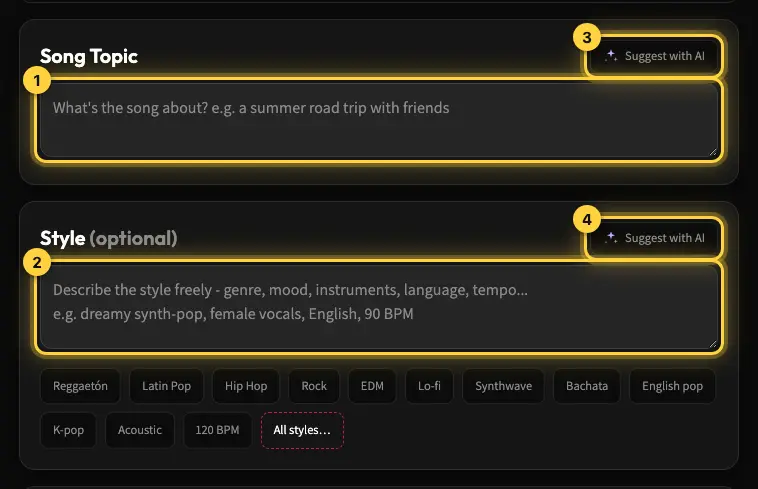
That is the whole workflow. Want ideas before you start? Browse the Explore page to hear what other creators are making, or read the create a song help article for every option on the Create page. When you are ready, open the Create page and make your first vocal-free track.
Frequently asked questions
How do I remove the vocals from a song and keep only the backing track?
With AI generation you do not remove anything. Instead of stripping vocals from an existing recording, which needs stem separation and still leaves artifacts, you describe the music you want and add an explicit instruction such as "instrumental only, no vocals" or "backing track, no lead singer". The model composes a brand-new vocal-free track from scratch, so there is nothing to subtract and no leftover vocal bleed. Kleep does not separate stems or remove vocals from songs you upload.
What is the difference between an instrumental and a karaoke track?
An instrumental is a full arrangement with no lead vocal, meant to stand on its own: background music, film scoring, a bed under a voiceover. A karaoke track is an instrumental built for someone to sing over, so it keeps a clear melody, tempo and structure and leaves space in the middle of the mix where the lead vocal would sit. The same AI process makes both; your prompt decides which.
How do I write a prompt that gives me a karaoke-ready track?
State the genre and mood, the tempo and energy, the instruments to feature, then add "no vocals" and ask for clear verse and chorus sections for singing over. For example: "an uplifting pop instrumental, bright piano and light drums, medium tempo, no vocals, with clear verse and chorus sections for singing over". That final clause turns a plain instrumental into something a live singer can follow.
Why does my backing track fight the singer's voice?
Usually the arrangement is too dense or the tempo and key sit badly for the performer. Ask for a lighter arrangement so the middle of the mix stays open, mention a comfortable moderate tempo, and regenerate if the track sits too high or too low. Keep the structure predictable, verse, chorus, verse, so people can follow live, and compare the two versions every creation gives you.
Can I play AI-generated karaoke tracks at a wedding or use them under a YouTube video?
Yes, and this is where original AI instrumentals shine. Because the track was composed from scratch rather than stripped from a copyrighted hit, you avoid the licensing headaches that come with playing commercial recordings at events or in monetized videos. Kleep assigns you any rights it holds and allows commercial use on every plan, including free credits, though purely AI-generated music may not be protected by copyright and uniqueness is not guaranteed, so read the terms before client work.
About the author
Kleep Editorial TeamAI music guides and product team
The Kleep editorial team builds and tests Kleep's AI song generator every day and writes practical, hands-on guides to creating songs with AI in English and Hebrew.
Keep reading
How Kleep Sings Hebrew: Every Layer Between Your Words and the Song
AI music tools were built for English. Every layer Kleep adds for Hebrew: grammar and gender checks, Dicta nikud, phonetic fixes and voice matching.
Creating Religious Music With AI: Niggunim, Piyyutim and Kodesh Songs in Hebrew
Create religious and Jewish music with AI in Hebrew: niggunim, piyyutim, Shabbat and holiday songs, with natural Hebrew pronunciation in minutes.
AI Song Composer: How to Write an Original Melody Without Knowing Any Notes
No need to read music to compose an original song. Use Kleep as your AI composer and turn a mood, theme or a few lines into a full melody in minutes.