
Suno vs. Kleep: Where Is It Easiest to Create a Song in Hebrew?
If you have searched for an AI music tool lately, you have almost certainly run into Suno. It is one of the best known names in AI song generation, and it does an impressive job in English. But the question many Hebrew speakers actually ask is narrower and more practical: where is it easiest to create a song in Hebrew? That is a different problem, and the answer is not automatically the biggest brand. In this comparison we look at both tools honestly, focusing on what matters when your lyrics, your accent, and your audience are all Hebrew. Full disclosure: Kleep generates the music with Suno's model through an API provider. What Kleep adds is the Hebrew layer: lyrics, gender agreement, automatic nikud and phonetic spelling for the singer. Some links to other tools are affiliate links; it does not change our assessment.
Why Hebrew is the hard part
Most AI music tools are trained and tuned first and foremost for English. That is not a criticism, it is simply where the largest datasets and the largest user base live. English is written the way it is roughly sung, and the models have heard millions of hours of it.
Hebrew breaks several of those assumptions at once. It is written right to left, vowels are usually implied rather than written, and the same consonant string can be pronounced in very different ways depending on nikud (the vowel points). A model that guesses wrong will sing a word with the stress in the wrong place, swap a vowel, or flatten the final guttural sound that gives Hebrew its character.
So the real test for any tool is not whether it can make a catchy track. It is whether the finished vocal actually sounds like a native Hebrew singer pronouncing your words correctly. This is where preparing the Hebrew before it reaches the singer makes the difference.
How Suno handles Hebrew
Suno is a powerful, flexible engine with a large community and a wide range of styles. For English and for many major world languages it produces polished, radio ready results, and it gives advanced users a lot of control through style prompts and custom modes. Suno keeps releasing newer model versions, so results change over time (last checked: October 2026).
With Hebrew, the experience is more mixed. Because Hebrew is not its primary focus, you often need to fight the tool a little: coaxing the right pronunciation, retrying to fix a mangled word, or accepting an accent that sounds slightly off to a native ear. Many Hebrew users end up transliterating words or rewriting lines just to get the singer to say them correctly. It can be done, but it takes patience and experimentation, and the interface assumes you are comfortable steering a general purpose model.
The honest summary: Suno is excellent software that happens to treat Hebrew as one language among hundreds, rather than as a first class citizen.
How Kleep handles Hebrew
Kleep generates the music with Suno's model through an API provider. What Kleep adds is the Hebrew layer: lyrics, gender agreement, automatic nikud and phonetic spelling for the singer. So the voices come from the same model you would use on Suno; the difference is what the model receives. Instead of pasting unvocalized Hebrew and hoping, Kleep prepares the lyrics so the singer has a much better chance of pronouncing them the way a real person would. More on this in how the Hebrew layer works.
In practice that means a few concrete things:
- Automatic nikud and phonetic spelling. Lyrics are prepared with the vowel points and spelling that guide the singer, so words are far more likely to land with the right stress and vowels instead of a lucky guess.
- Gender agreement in the lyrics. Lyrics written to or about a woman or a man use the right Hebrew forms, and the singer's gender is matched to the lyrics unless you write "male vocal" or "female vocal" in Style.
- Right to left, Hebrew first interface. The whole app reads naturally in Hebrew, so you are not translating an English tool in your head while you work.
- Finished songs, not raw stems. Each creation gives you two complete versions - lyrics and vocals - ready to share, without extra steps.
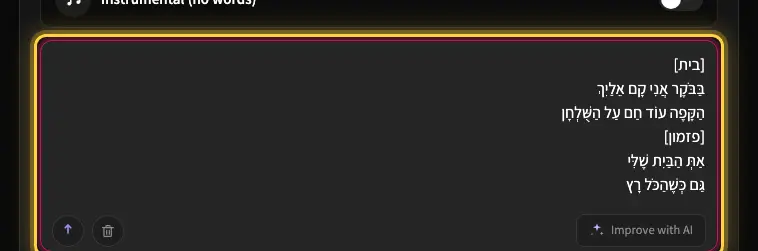
You can hear the difference for yourself on the Explore page, where real Hebrew songs made with the tool are playing.
A side by side comparison
No tool wins on every axis, and Suno is genuinely strong. Here is a fair look at where each one shines for a Hebrew speaker:
- Hebrew pronunciation and nikud: Kleep adds nikud and phonetic spelling automatically; on Suno directly you prepare the Hebrew yourself.
- Vocal quality: Both run on Suno's model, so the voices themselves are similar; what changes the Hebrew result is how the lyrics are prepared before the model sings them.
- Interface and language: Kleep is Hebrew first and deliberately simple; Suno is English first with more advanced controls.
- Style range and breadth: Suno offers a very wide catalog of styles and a large community; Kleep focuses on getting Hebrew right with a clean set of options.
- Finished output: Kleep hands you a complete song with lyrics and vocals; Suno gives strong tracks but expects more hands on tweaking.
- Learning curve: Both are easy to start with; Kleep keeps the Hebrew steps automatic, while Suno's advanced options reward users who enjoy fine tuning prompts.
If your priority is maximum stylistic control in English, Suno is a reasonable pick. If your priority is a great song in Hebrew with the least friction, Kleep is built for exactly that.
How easy is it, really? A Hebrew song in five steps
The clearest way to judge ease of use is to walk through it. Here is the whole process of making a Hebrew song in Kleep:
- Open the create page and choose Hebrew as your lyrics language.
- Type a short idea in plain Hebrew - a feeling, an occasion, or a person you want the song to be about.
- Pick a style or mood, or simply let the studio suggest one for you.
- Press create and let the studio write the lyrics, set the nikud, and produce the vocals.
- Listen to the two versions, and if you want, make a small change and regenerate - then share your finished song. Cover art is a Premium feature, and MP3 download comes with Premium, or for 30 days after buying a credit pack. See credits and Premium.
There is no prompt engineering, no transliteration tricks, and no fighting the singer to pronounce a word. That simplicity is the whole point.
So which should you choose?
Suno is a remarkable tool and deserves its reputation, especially for English and for users who love to experiment. If you already work in English and enjoy fine grained control, it will serve you well.
But if you are a Hebrew speaker who wants correct pronunciation, natural vocals, a simple interface, and a finished song without a learning curve, Kleep is the easier choice: it runs the same music model but handles the Hebrew preparation for you, so you skip the manual work.
The best way to decide is to try it. Head to the create page and make your first Hebrew song in a few minutes, browse more examples on Explore, or see our Suno alternatives for Hebrew.
Frequently asked questions
Does Suno support Hebrew lyrics and vocals?
It can sing Hebrew, but Hebrew is one of hundreds of languages it handles rather than a focus, so results are mixed. Expect to retry mangled words, coax the pronunciation through style prompts, and sometimes accept stress or vowels that sound slightly off to a native ear. Many Hebrew users end up transliterating lines or rewriting them just to get the singer to say them correctly. It works with patience; it is not the path of least resistance.
Which is easier for a Hebrew song, Suno or a Hebrew-first tool like Kleep?
For Hebrew specifically, the Hebrew-first tool is easier. Kleep uses Suno's model too, but it writes the lyrics, adds nikud and phonetic spelling before the vocal is produced, so the singer gets much clearer Hebrew input, the interface reads right to left, and you get a finished song with lyrics and vocals. Suno offers a wider style catalog and deeper controls, but it is English-first and expects you to steer a general-purpose model by hand.
Do I need prompt engineering to get Suno to sing Hebrew correctly?
Often, yes. Because Hebrew is written without vowels and the model has to guess the nikud, getting a clean Hebrew vocal out of a general-purpose tool usually means iterating on style prompts, retrying individual words and sometimes transliterating tricky lines. A tool built around Hebrew removes that layer: you type a short idea in plain Hebrew, choose a mood, and the studio writes the lyrics, sets the nikud and produces the vocal without any prompt tricks.
When should I pick Suno even if I sing in Hebrew?
When stylistic range matters more than pronunciation. Suno has a very wide catalog of genres, a large community sharing techniques, and advanced modes that reward people who enjoy fine-tuning prompts. If most of your songs are in English, or you want to experiment across many styles and do not mind extra retries on the Hebrew ones, it is a reasonable choice. If the goal is a correct, natural Hebrew song with minimal friction, it is not the fastest route.
Does Suno add nikud to Hebrew lyrics automatically?
Not in a way you can rely on. It takes the lyrics as you paste them, and unvocalized Hebrew leaves the model guessing which vowels and which stress to sing, which is exactly where mangled words come from. You can add nikud yourself to ambiguous words to improve the odds. A Hebrew-first tool prepares the lyrics with the vowel points that guide the singer as part of the normal flow, so words land with the right stress instead of a lucky guess.
Where can I hear real Hebrew AI songs before choosing between the tools?
Listen to finished songs rather than demos. The Explore page plays real Hebrew tracks made with the Hebrew-first tool, so you can judge the things that matter: whether names are pronounced correctly, whether the stress falls on the right syllable, and whether the guttural and final sounds survive. Then run the same idea through Suno and compare the two vocals side by side. Your own ears on your own lyrics are the fairest test.
About the author
Kleep Editorial TeamAI music guides and product team
The Kleep editorial team builds and tests Kleep's AI song generator every day and writes practical, hands-on guides to creating songs with AI in English and Hebrew.
Keep reading
Suno vs Udio vs Mureka vs Lyria: Which Sings Hebrew Best?
Suno, Udio, Mureka and Google Lyria side by side, judged on the thing that decides a Hebrew song: correct pronunciation. See which AI music tool wins.
Udio Alternatives for Hebrew Songs: An Honest Comparison
Udio makes impressive AI music, but Hebrew is not its native language. What to check in a Udio alternative, from nikud to downloads, and how Kleep compares.
Mureka vs Kleep: Which One Actually Sings Hebrew?
Mureka is a capable multilingual AI music tool, but does it sing Hebrew correctly? A comparison of nikud, accent, interface and output, plus a quick test.